<?xml version="1.0" encoding="utf-8"?>
<feed xmlns="http://www.w3.org/2005/Atom">
    <id>https://hsiaopan.github.io</id>
    <title>Panalyz</title>
    <updated>2020-06-14T18:09:25.968Z</updated>
    <generator>https://github.com/jpmonette/feed</generator>
    <link rel="alternate" href="https://hsiaopan.github.io"/>
    <link rel="self" href="https://hsiaopan.github.io/atom.xml"/>
    <subtitle>温故而知新</subtitle>
    <logo>https://hsiaopan.github.io/images/avatar.png</logo>
    <icon>https://hsiaopan.github.io/favicon.ico</icon>
    <rights>All rights reserved 2020, Panalyz</rights>
    <entry>
        <title type="html"><![CDATA[游戏运营数据分析——指标体系]]></title>
        <id>https://hsiaopan.github.io/post/Game_Data_Analysis_of_Operation_Metrics/</id>
        <link href="https://hsiaopan.github.io/post/Game_Data_Analysis_of_Operation_Metrics/">
        </link>
        <updated>2020-06-04T09:09:14.000Z</updated>
        <summary type="html"><![CDATA[<p>待补充完善</p>
]]></summary>
        <content type="html"><![CDATA[<p>待补充完善</p>
<!-- more -->
<p>Photo by Nassim All on Unsplash</p>
<h3 id="1-激活率和激活且登录率">1 激活率和激活且登录率</h3>
<h4 id="11-激活">1.1 激活</h4>
<p>激活是指用户安装好客户端以后连接网络打开客户端</p>
<ul>
<li><strong>激活率</strong>：激活总量/安装总量</li>
</ul>
<h4 id="12-激活且登录率">1.2 激活且登录率</h4>
<p>激活且登录量是指用户激活后进入游戏的用户数量</p>
<ul>
<li><strong>激活且登录率</strong>：激活且登录总量/激活码激活总量</li>
</ul>
<h4 id="13-登录率的效果参考">1.3 登录率的效果参考：</h4>
<ul>
<li>优秀：登录率大于90%</li>
<li>较好：登录率80%~90%</li>
<li>一般：登录率60%~80%</li>
<li>较差：登录率小于60%</li>
</ul>
<h3 id="2-留存率">2 留存率</h3>
<p>留存率是指新增用户在一段时间内再次登录游戏所占的比例，有次日留存、7日留存、30日留存、周留存、月留存等等。</p>
<h4 id="21-日留存率">2.1 日留存率</h4>
<ul>
<li>次日留存率：第1天新增用户在第2天登录过的人数/第1天新增用户量</li>
<li>7日留存率：第1天新增用户在第7天登录过的人数/第1天新增用户量</li>
<li>30日留存率：第1天新增用户在第30天登录过的人数/第1天新增用户量</li>
</ul>
<h4 id="22-周留存率">2.2 周留存率</h4>
<ul>
<li>周留存率：第1周新增用户量在第二周登录过的人数/第1周新增用户量</li>
</ul>
<h4 id="23-月留存率">2.3 月留存率</h4>
<ul>
<li>月留存率：第1月新增用户量在第2月登录过的人数/第1月新增用户量</li>
</ul>
<h4 id="24-留存率评价大致参考标准">2.4 留存率评价（大致参考标准）</h4>
<ul>
<li>优秀：次日留存率超过65%，3日留存率超过55%，7日留存率超过35%</li>
<li>良好：次日留存率超过50%，3日留存率超过35%，7日留存率超过25%</li>
<li>一般：次日留存率超过35%，3日留存率超过25%，7日留存率超过15%</li>
</ul>
<h3 id="3-用户付费指标">3 用户付费指标</h3>
<h4 id="31-付费率">3.1 付费率</h4>
<p>付费率是指每日付费用户占活跃用户的比例</p>
<ul>
<li>付费率：付费人数/活跃人数</li>
</ul>
<h4 id="32-arppu">3.2 ARPPU</h4>
<p>ARPPU是指平均每付费用户收入</p>
<ul>
<li>ARPPU：付费金额/付费人数</li>
</ul>
<h4 id="33-arpu">3.3 ARPU</h4>
<p>ARPU是指每个用户平均收入</p>
<ul>
<li>ARPU：付费金额/活跃人数</li>
</ul>
<h4 id="34-付费指标评价">3.4 付费指标评价</h4>
<p>原则上肯定是越高越好。以手游为例，不考虑手游类型，一般ARPU超过6元为较好产品，低于3元为较差产品。</p>
<h3 id="4-导入用户成本">4 导入用户成本</h3>
<h4 id="41-cpccost-per-click">4.1 CPC（Cost Per Click）</h4>
<p>CPC指单个点击用户的成本</p>
<ul>
<li>CPC：广告投入总价/所投入的广告带来的点击用户数量</li>
</ul>
<h4 id="42-cpacost-per-action">4.2 CPA（Cost Per Action）</h4>
<p>CPA指平均每个激活用户的成本</p>
<ul>
<li>CPA：广告投入总价/所有投入广告带来的激活用户数量</li>
</ul>
<h4 id="43-cprcost-per-register">4.3 CPR（Cost Per Register）</h4>
<p>CPR指平均每个注册用户的成本</p>
<ul>
<li>CPR：广告投入总价/所有投入广告带来的注册用户数量</li>
</ul>
<h4 id="44-cplcost-per-login">4.4 CPL（Cost Per Login）</h4>
<p>CPL指平均每个登录用户的成本</p>
<ul>
<li>CPL：广告投入总价/所有投入广告带来的登录用户数量</li>
</ul>
<p>CPC、CPA、CPR、CPL都是衡量广告投放效果重要指标，用户转化漏斗情况</p>
<ul>
<li>CPC &lt; CPA &lt; CPR &lt; CPL</li>
<li>各项指标的成本越低，说明效果越好</li>
<li>最终还是要参考用户在游戏内的<strong>留存和付费情况</strong></li>
</ul>
<h3 id="5-ltvlife-time-value">5 LTV（Life Time Value）</h3>
<p>LTV是指用户在生命周期内为该游戏付费的总计，可以看成是一个长期积累ARPU值</p>
<ul>
<li>每个用户平均LTV：每月ARPU*用户按月计的平均生命周期</li>
<li>LTV与CPA关系：当CPA &gt; LTV时，理解为获取用户的成本大于用户产出，可以判断市场投放效果，以及判断是否有必要继续投放或停止投放尽早止损。</li>
</ul>
<h3 id="6-roireturn-on-investment">6 ROI（Return On Investment）</h3>
<p>ROI是指投资回报率，衡量产品付出与收获</p>
<p>ROI参考的价值</p>
<ul>
<li>衡量产品推广的盈亏</li>
<li>筛选推广渠道，分析每个渠道的流量变现能力</li>
<li>实时分析渠道付费流量获取的效应，调整投入力度</li>
<li>评估后续推广活动是否成功</li>
<li>评估直接或间接ROI的推广又是或劣势</li>
<li>综合其他数据（留存，新增，付费等）调整游戏方向，进行流量转化</li>
</ul>
<p>参考：<br>
[https://zhuanlan.zhihu.com/p/135467184]<br>
[https://zhuanlan.zhihu.com/p/136273219]</p>
]]></content>
    </entry>
    <entry>
        <title type="html"><![CDATA[Python实现10大排序算法]]></title>
        <id>https://hsiaopan.github.io/post/Algorithm_of_Sorting_by_Python/</id>
        <link href="https://hsiaopan.github.io/post/Algorithm_of_Sorting_by_Python/">
        </link>
        <updated>2020-06-01T12:44:05.000Z</updated>
        <summary type="html"><![CDATA[<p>Python实现10种排序算法。通过Java版改写，可能有句法不那么Python的问题。另外，第10个还没写出来，有空再补上。</p>
]]></summary>
        <content type="html"><![CDATA[<p>Python实现10种排序算法。通过Java版改写，可能有句法不那么Python的问题。另外，第10个还没写出来，有空再补上。</p>
<h2 id="-more-"><!-- more --></h2>
<ul>
<li>
<h3 id="bubble-sort-冒泡排序">Bubble Sort 冒泡排序</h3>
</li>
</ul>
<blockquote>
<p>比较相邻的元素，如果第一个比第二个大，就交换他们。对每一对相邻元素做相同的工作，从开始第一对到结尾的最后一对，这样在最后的元素应该会是最大的数。针对所有的元素重复以上的步骤，除了最后一个重复以上步骤，直到排序完成.</p>
</blockquote>
<pre><code>def bubble_sort(arr):
    for i in range(len(arr) - 1):
        for j in range(len(arr) - i - 1):
            if arr[j] &gt; arr[j + 1]:
                arr[j], arr[j + 1] = arr[j + 1], arr[j]
    print(arr)
    return

list1 = [1, 23, 43, 2, 3, 54, 6, 34, 81, 99, 342, 3, 4452, 344, 234, 44, 55, 67, 57, 24, 723]
bubble_sort(list1)
</code></pre>
<ul>
<li>
<h3 id="selection-sort-选择排序">Selection Sort 选择排序</h3>
</li>
</ul>
<blockquote>
<p>首先从未排序序列中找到最小（大）元素，存放到排序序列的起始位置，然后从剩余未排序元素中继续寻 找最小（大）元素，移动到已排序末尾。以此类推，直到所有元素均排序完毕</p>
</blockquote>
<pre><code>def selection_sort(arr):
    for i in range(len(arr) - 1):
        min_index = i
        for j in range(i + 1, len(arr)):
            if arr[j] &lt; arr[min_index]:
                min_index = j
        arr[i], arr[min_index] = arr[min_index], arr[i]
    return arr

list1 = [1, 23, 43, 2, 3, 54, 6, 34, 81, 99, 342, 3, 4452, 344, 234, 44, 55, 67, 57, 24, 723]
print(selection_sort(list1))
</code></pre>
<ul>
<li>
<h3 id="insertion-sort-插入排序">Insertion Sort 插入排序</h3>
</li>
</ul>
<blockquote>
<p>通过构建有序序列，对未排序数据，在已排序序列中从后向前扫描，找到相应位置并插入</p>
</blockquote>
<pre><code>def insertion_sort(arr):
    for i in range(1, len(arr)):
        previous = i - 1
        current = arr[i]
        while previous &gt;= 0 and arr[previous] &gt; current:
            arr[previous + 1] = arr[previous]
            previous -= 1
        arr[previous+1] = current
    return arr

list1 = [1, 23, 43, 2, 3, 54, 6, 34, 81, 99, 342, 3, 4452, 344, 234, 44, 55, 67, 57,24, 723]
print(insertion_sort(list1))
</code></pre>
<ul>
<li>
<h3 id="shell-sort-希尔排序">Shell Sort 希尔排序</h3>
</li>
</ul>
<blockquote>
<p>简单插入排序的改进版，它与插入排序不同之处在于，他会优先比较距离较远的元素希尔排序又叫“缩小增量排序”</p>
</blockquote>
<pre><code>def shell_sort(arr):
    gap = len(arr) // 2
    while gap &gt; 0:
        for i in range(gap, len(arr)):
            while i - gap &gt;= 0 and arr[i] &lt; arr[i - gap]:
                arr[i], arr[i-gap] = arr[i - gap], arr[i]
                i -= gap
        gap = gap // 2
    return arr

list1 = [1, 23, 43, 2, 54, 6, 34, 81, 99, 342, 3, 4452, 344, 234, 44, 55, 67, 57, 24, 723]
print(shell_sort(list1))
</code></pre>
<ul>
<li>
<h3 id="merge-sort-归并排序">Merge Sort 归并排序</h3>
</li>
</ul>
<blockquote>
<p>将已有序的子序列合并，得到完整有序的序列；即先使每个子序列有序，再使子序列段间有序</p>
</blockquote>
<pre><code>def merge_sort(arr):
    if len(arr) &lt; 2:
        return arr
    middle = len(arr) // 2
    left = merge_sort(arr[:middle])
    right = merge_sort(arr[middle:])
    return merge(left, right)

def merge(a, b):
    aux = []
    while len(a) &gt; 0 and len(b) &gt; 0:
        if a[0] &lt;= b[0]:
            aux.append(a.pop(0))
        else:
            aux.append(b.pop(0))
    else:
        if len(a) == 0:
            aux += b
        else:
            aux += a
    return aux


list1 = [1, 23, 43, 2, 54, 6, 34, 81, 99, 342, 3, 4452, 344, 234, 44, 55, 67, 57, 24, 723]
print(merge_sort(list1))
</code></pre>
<ul>
<li>
<h3 id="quick-sort-快速排序">Quick Sort 快速排序</h3>
</li>
</ul>
<blockquote>
<p>在序列中选择一个基准点，然后分别从序列的两段扫描，设两个指示标志。从后半部分开始，如果有元素 比该基准点小，就交换两个指示标志位置的值，然后从前半部分开始扫描，发现有元素大于基准点的值，就交换两个指示标志位置的值，如此往复循环，直到俩指示标志的前者与后者相当或前者大于后者，交换 位置，一次排序完成了。以后采用递归的方式，分别对前半部分和后半部分排序</p>
</blockquote>
<pre><code>def quick_sort(arr):
    return q_sort(arr, 0, len(arr) - 1)

def q_sort(arr, lo, hi):
    if lo &lt; hi:
        pivot = partition(arr, lo, hi)
        q_sort(arr, lo, pivot - 1)
        q_sort(arr, pivot + 1, hi)
    return arr

def partition(arr, lo, hi):
    pivot_value = arr[hi]
    i = lo - 1
    for j in range(lo, hi):
        if arr[j] &lt;= pivot_value:
            i += 1
            arr[i], arr[j] = arr[j], arr[i]
    arr[i + 1], arr[hi] = arr[hi], arr[i + 1]
    return i + 1

list1 = [1, 23, 43, 2, 54, 6, 34, 81, 99, 342, 3, 4452, 344, 234, 44, 55, 67, 57, 24, 723]
print(quick_sort(list1))
</code></pre>
<pre><code>def quick_sort(arr, lo, hi):
    if lo &gt; hi:
        return
    stack = []
    stack.append(lo)
    stack.append(hi)
    while stack:
        lo = stack.pop(0)
        hi = stack.pop(0)
        if hi - lo &lt;= 0:
            continue
        pivot = arr[hi]
        i = lo - 1
        for j in range(lo, hi):
            if arr[j] &lt;= pivot:
                i += 1
                arr[i], arr[j] = arr[j], arr[i]
        arr[i + 1], arr[hi] = arr[hi], arr[i + 1]
        stack.extend([lo, i, i + 2, hi])
</code></pre>
<ul>
<li>
<h3 id="heap-sort-堆排序">Heap Sort 堆排序</h3>
</li>
</ul>
<blockquote>
<p>堆积是一个近似完全二叉树的结构，并同时满足堆积的性质：即子节点的键值或索引总是小于（或大于）它的父节点。<br>
将初始待排序关键字序列(R1,R2,R3,...Rn)构成一顶堆，此堆为初始的无序区：将堆顶元素R[1]与最后一个元素R[n]交换，此时得到新的无序区（R1,R2,R3,...Rn-1）和新的有序区，且满足R[1,2,3,...,n-1] &lt;= R[n]；由于交换后的新的堆顶R[1]可能违反堆的性质，因为需要对当前无序区（R1,R2,R3,...,Rn-1）调整为新堆，然后再次将R[1]与无序区最后一个元素交换，得到新的无序区（R1,R2,R3,...,Rn-2）和新的有序区（Rn-1,Rn）<br>
不断重复此过程直到有序区的元素个数为n-1，则整个排序过程完成</p>
</blockquote>
<pre><code>def heapify(arr, i, k):
    # 构建堆的规则
    j = 2 * i
    while j &lt;= k:
        if j &lt; k and arr[j] &lt; arr[j + 1]:
            j += 1
        if arr[i] &gt;= arr[j]:
            break
        arr[i], arr[j] = arr[j], arr[i]
        i = j
        j *= 2

def heap_sort(arr):
    # 从最后一个有子节点的节点开始构建堆
    last = len(arr) // 2 - 1
    for i in range(last, -1, -1):
        heapify(arr, i, len(arr) - 1)

    # 将最大的数放在堆的最后一个位置，并将剩余部分重新构建堆
    for k in range(len(arr) - 1, 0, -1):
        arr[0], arr[k] = arr[k], arr[0]
        heapify(arr, 0, k - 1)

if __name__ == &quot;__main__&quot;:
    arr = [1, 23, 43, 2, 54, 6, 34, 81, 99, 342, 3, 4452, 344, 234, 44, 55, 67, 57, 24, 723]
    heap_sort(arr)
    print(arr)

list1 = [1, 23, 43, 2, 54, 6, 34, 81, 99, 342, 3, 4452, 344, 234, 44, 55, 67, 57, 24, 723]
</code></pre>
<ul>
<li>
<h3 id="counting-sort-计数排序">Counting Sort 计数排序</h3>
</li>
</ul>
<blockquote>
<p>计数排序不是基于比较的排序算法，其核心在于将输入的数据 值转化为键存储在额外开辟的数组空间中。<br>
作为一种线性时间复杂度的排序，计数排序要求输入的数据必须是有确定范围的整数，找出待排序的数组中最大和最小的元素；统计数组中每个值为i的元素出现的个数，存入数组C的第i项；对所有的计数累加，反向填充目标数组：将每个元素i放在新数组的第C(i)项，每放一个元素就将C(i)减去1</p>
</blockquote>
<pre><code>def counting_sort(arr, largest):
    bucket = [0]*(largest + 1)
        sorted_index = 0

    for i in range(len(arr)):
        bucket[arr[i]] = arr.count(arr[i])

    for j in range(len(bucket)):
        while bucket[j] &gt; 0:
            arr[sorted_index] = j
            sorted_index += 1
            bucket[j] -= 1
   return arr

list1 = [1, 23, 43, 2, 24, 54, 6, 34, 81, 99, 342, 3, 4452, 344, 234, 44, 55, 67, 57, 24, 723]
print(counting_sort(list1, 4452))
</code></pre>
<ul>
<li>
<h3 id="bucket-sort-桶排序">Bucket Sort 桶排序</h3>
</li>
</ul>
<blockquote>
<p>桶排序是计数排序的升级版。它利用函数的映射关系，高效与否的关键在于这个映射函数的确定，假设输入数据服从均匀分布，将数据分到有限数量的桶里，每个桶分别排序。每个桶里的排序，有可能再使用比的排序算法，或是以递归方式继续使用桶排序</p>
</blockquote>
<ul>
<li>设置一个定量的数组当做空桶</li>
<li>遍历输入数据，并且把数据一个一个放到对应的桶里</li>
<li>对每个不是空的桶进行排序</li>
<li>从不是空的桶里把排好序的数据拼接起来</li>
</ul>
<pre><code>def bucket_sort(arr, bucket_size):
    if len(arr) == 0:
        return arr

    min_value = arr[0]
    max_value = arr[0]
    for i in range(len(arr)):
        if arr[i] &lt; min_value:
            min_value = arr[i]
        if arr[i] &gt; max_value:
            max_value = arr[i]

    # bucket_size = 5
    bucket_count = (max_value - min_value) // bucket_size + 1
    buckets = [[]*i for i in range(bucket_count)]

    for i in range(len(arr)):
        buckets[(arr[i] - min_value) // bucket_size].append(arr[i])
    # print(buckets)

    arr = []
    for i in range(len(buckets)):
        insertion_sort(buckets[i])
        for j in range(len(buckets[i])):
            arr.append(buckets[i][j])

    # print(buckets)

    return arr


list1 = [1, 23, 43, 2, 24, 54, 6, 34, 81, 99, 342, 3, 4452, 344, 234, 44, 55, 67, 57, 24, 723]
print(bucket_sort(list1, 50))
</code></pre>
<ul>
<li>
<h3 id="tbc">TBC</h3>
</li>
</ul>
]]></content>
    </entry>
    <entry>
        <title type="html"><![CDATA[母婴产品消费数据分析(MySQL/Tableau)]]></title>
        <id>https://hsiaopan.github.io/post/Data_Analysis_of_Maternal&amp;Child_Products_by_MySQL&amp;Tableau/</id>
        <link href="https://hsiaopan.github.io/post/Data_Analysis_of_Maternal&amp;Child_Products_by_MySQL&amp;Tableau/">
        </link>
        <updated>2020-05-22T06:56:03.000Z</updated>
        <summary type="html"><![CDATA[<p>Photo by Nynne Schrøder on Unsplash</p>
<p>复刻知乎网友的分析，终点还是熟悉过程，练习MySQL和Tableau</p>
]]></summary>
        <content type="html"><![CDATA[<p>Photo by Nynne Schrøder on Unsplash</p>
<p>复刻知乎网友的分析，终点还是熟悉过程，练习MySQL和Tableau</p>
<!-- more -->
<h2 id="1-分析目的">1 分析目的</h2>
<ul>
<li>了解母婴行业的发展趋势</li>
<li>分析找到重点客户</li>
<li>把握母婴产品主要使用对象</li>
<li>分析各类商品特征</li>
<li>找到受欢迎的母婴产品</li>
</ul>
<h2 id="2-理解数据">2 理解数据</h2>
<p>数据来自淘宝和天猫上购买母婴商品，时间段为2012年7月2日——2015年2月5日<br>
包含两个数据集，<br>
tianchi_mum_baby.csv 包含客户孩子的生日和性别</p>
<table>
<thead>
<tr>
<th>Column</th>
<th>user_id</th>
<th>birthday</th>
<th>gender</th>
</tr>
</thead>
<tbody>
<tr>
<td>描述</td>
<td>客户ID</td>
<td>生日</td>
<td>性别</td>
</tr>
</tbody>
</table>
<p>tianchi_mum_baby_trade_history.csv 包含历史交易记录</p>
<table>
<thead>
<tr>
<th>Column</th>
<th>user_id</th>
<th>auction_id</th>
<th>cat_id</th>
<th>cat1</th>
<th>property</th>
<th>buy_mount</th>
<th>day</th>
</tr>
</thead>
<tbody>
<tr>
<td>描述</td>
<td>客户ID</td>
<td>商品ID</td>
<td>商品子类ID</td>
<td>商品大类ID</td>
<td>商品属性</td>
<td>购买数量</td>
<td>交易时间</td>
</tr>
</tbody>
</table>
<h2 id="3-数据清洗">3 数据清洗</h2>
<p>由于 <code>property</code> 列是对商品属性的描述，对后续分析几乎无作用，所以将其剔除。</p>
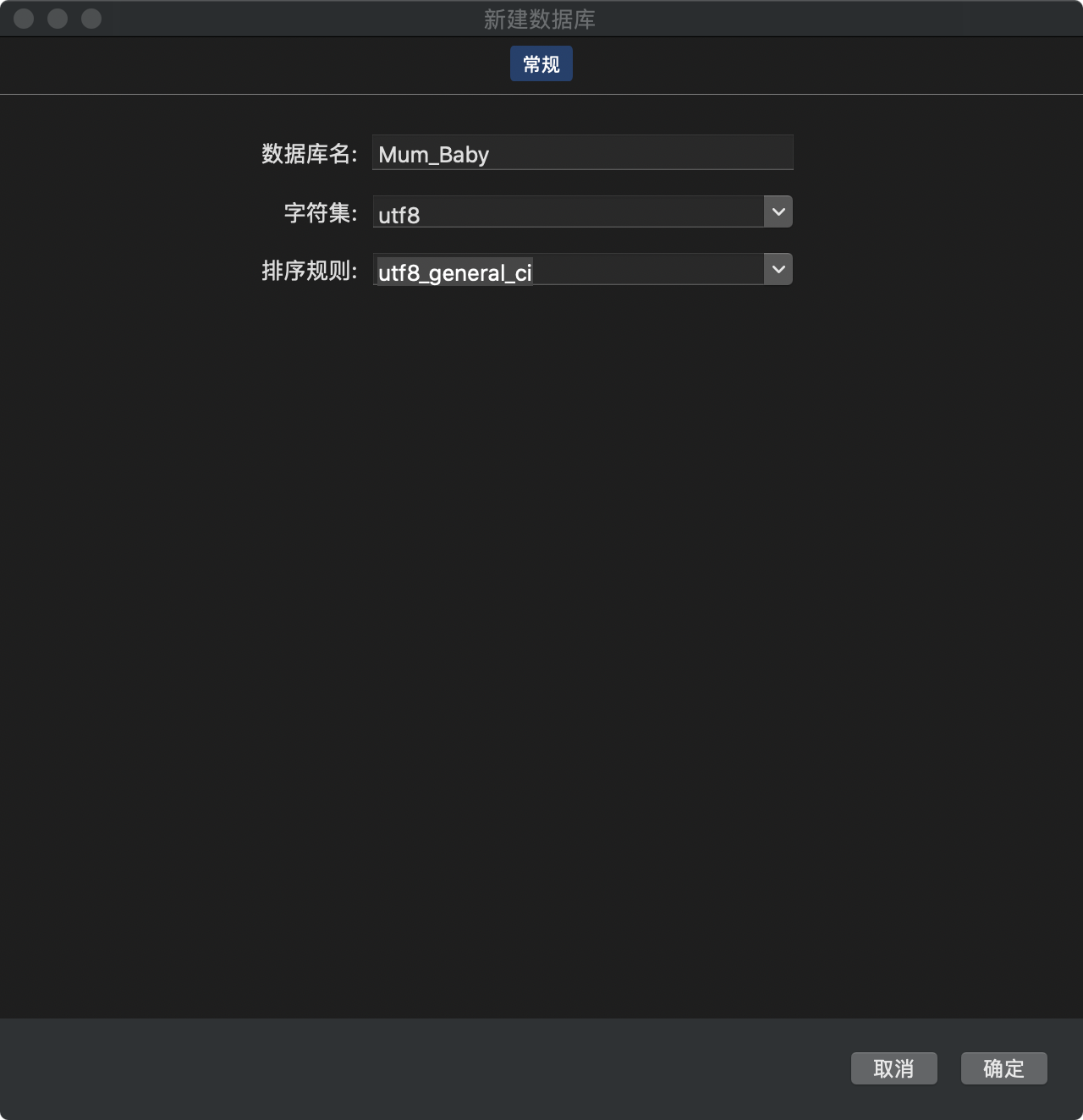
<p>打开<strong>Navicat</strong>，连接<strong>MySQL</strong>，新建数据库 <code>Mum_Baby</code> ，相关参数如下：<br>
<img src="https://hsiaopan.github.io/post-images/1591259315353.jpg" alt="" loading="lazy"></p>
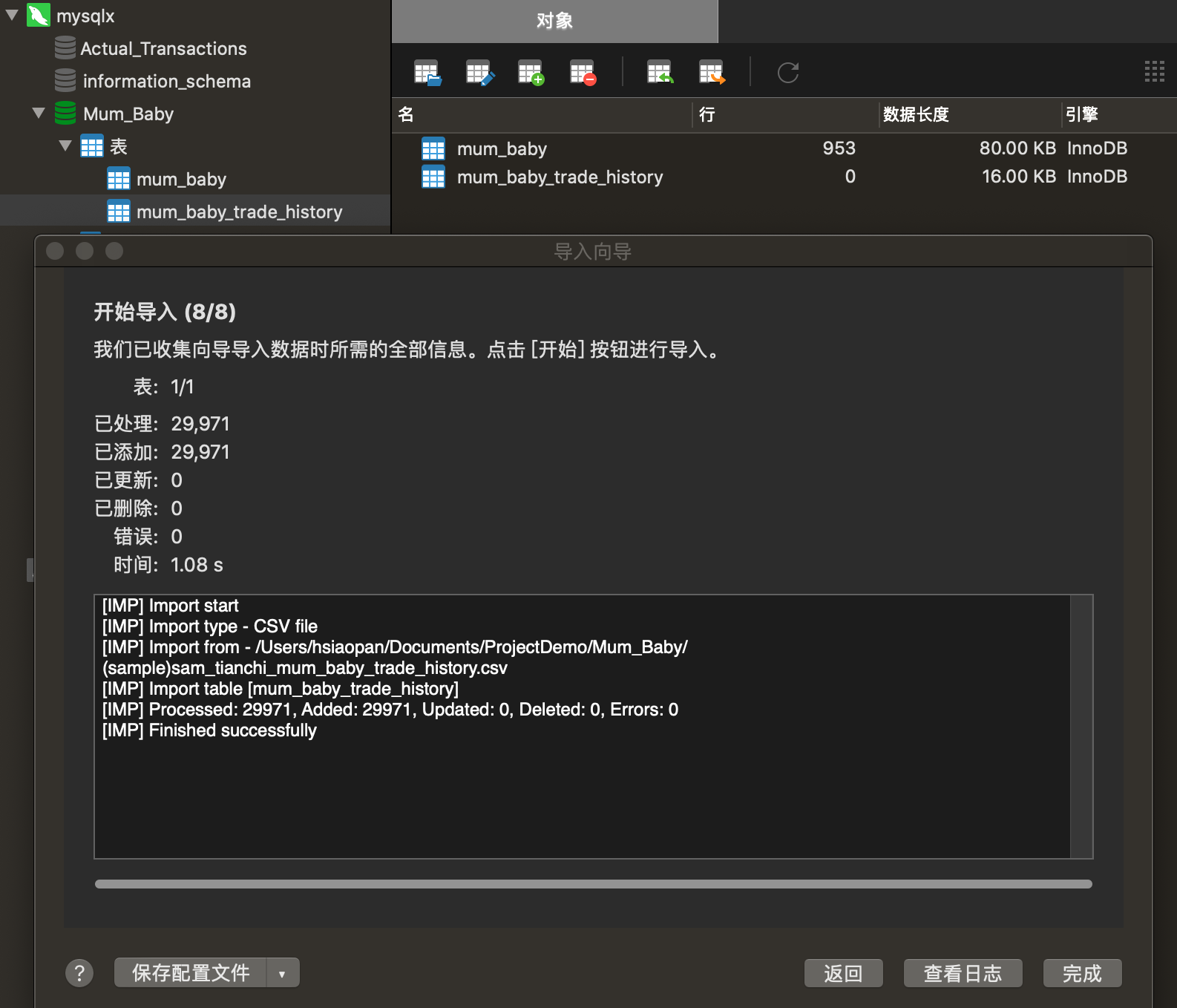
<p>在 <code>Mum_Baby</code> 数据库下的<strong>表</strong>里右键选择 <code>导入向导</code>，开始导入数据集<br>
<img src="https://hsiaopan.github.io/post-images/1591259492864.jpg" alt="" loading="lazy"></p>
<blockquote>
<p>此处导入数据容易遇坑，我这次就遇上了，详情可查看另外一篇文章<br>
<a href="https://hsiaopan.github.io/post/MySQL_ERR_1406/">MySQL导入数据 Data too long for column</a></p>
</blockquote>
<h3 id="31-删除重复值">3.1 删除重复值</h3>
<p>查询表 <code>mum_baby_trade_history</code> 记录数</p>
<pre><code>SELECT COUNT(*) FROM mum_baby_trade_history;
</code></pre>
<p>返回结果 <code>29971</code></p>
<p>通过非重复计数新建表 <code>trade_history</code> 并查询记录数</p>
<pre><code>CREATE TABLE trade_history 
SELECT DISTINCT * FROM mum_baby_trade_history;
SELECT COUNT(*) FROM trade_history;
</code></pre>
<p>返回结果 <code>29971</code>，与直接查询结果相同，说明没有重复值</p>
<h3 id="32-缺失值处理">3.2 缺失值处理</h3>
<p>先判断是否有NaN值</p>
<pre><code>SELECT * FROM mum_baby_trade_history
WHERE user_id IS NULL
	OR auction_id IS NULL
	OR cat_id IS NULL
	OR cat1 IS NULL
	OR buy_mount IS NULL
	OR `day` IS NULL;

</code></pre>
<p><img src="https://hsiaopan.github.io/post-images/1591679091580.jpg" alt="" loading="lazy"><br>
返回结果为空，说明没有NaN值</p>
<h3 id="33-空字符串处理">3.3 空字符串处理</h3>
<p>先判断是否有缺失值</p>
<pre><code>SELECT * FROM mum_baby_trade_history
WHERE user_id = ''
	OR auction_id = ''
	OR cat_id = ''
	OR cat1 = ''
	OR buy_mount = ''
	OR `day` = '';

</code></pre>
<p><img src="https://hsiaopan.github.io/post-images/1591679268399.jpg" alt="" loading="lazy"><br>
返回结果为空，说明无缺失值</p>
<h3 id="34-错误信息处理">3.4 错误信息处理</h3>
<p><code>mum_baby</code> 表中 <code>gender</code> 存在一些值为 <strong>2</strong>，可能为错误信息，也可能是婴儿为出生时产生的订单，客户不能判断婴儿性别。</p>
<pre><code>CREATE TABLE baby_birthday 
SELECT * FROM mum_baby 
WHERE gender = 0
	OR gender = 1;
</code></pre>
<p>这里暂时将其剔除，同时新建一个表 <code>baby_birthday</code></p>
<h2 id="4-数据分析">4 数据分析</h2>
<blockquote>
<p>以下分析，数据库操作部分通过Tableau的<code>自定义SQL</code>提取数据库表的，然后通过Tableau可视化</p>
</blockquote>
<h3 id="41-总体业绩分析">4.1 总体业绩分析</h3>
<h4 id="411-母婴行业发展趋势及背景">4.1.1 母婴行业发展趋势及背景</h4>
<pre><code>SELECT 
	COUNT(DISTINCT user_id) AS 每年客户数,
	COUNT(*) AS 每年订单数,
	extract(YEAR FROM `day`) AS 年
FROM
	trade_history
GROUP BY extract(YEAR FROM `day`)
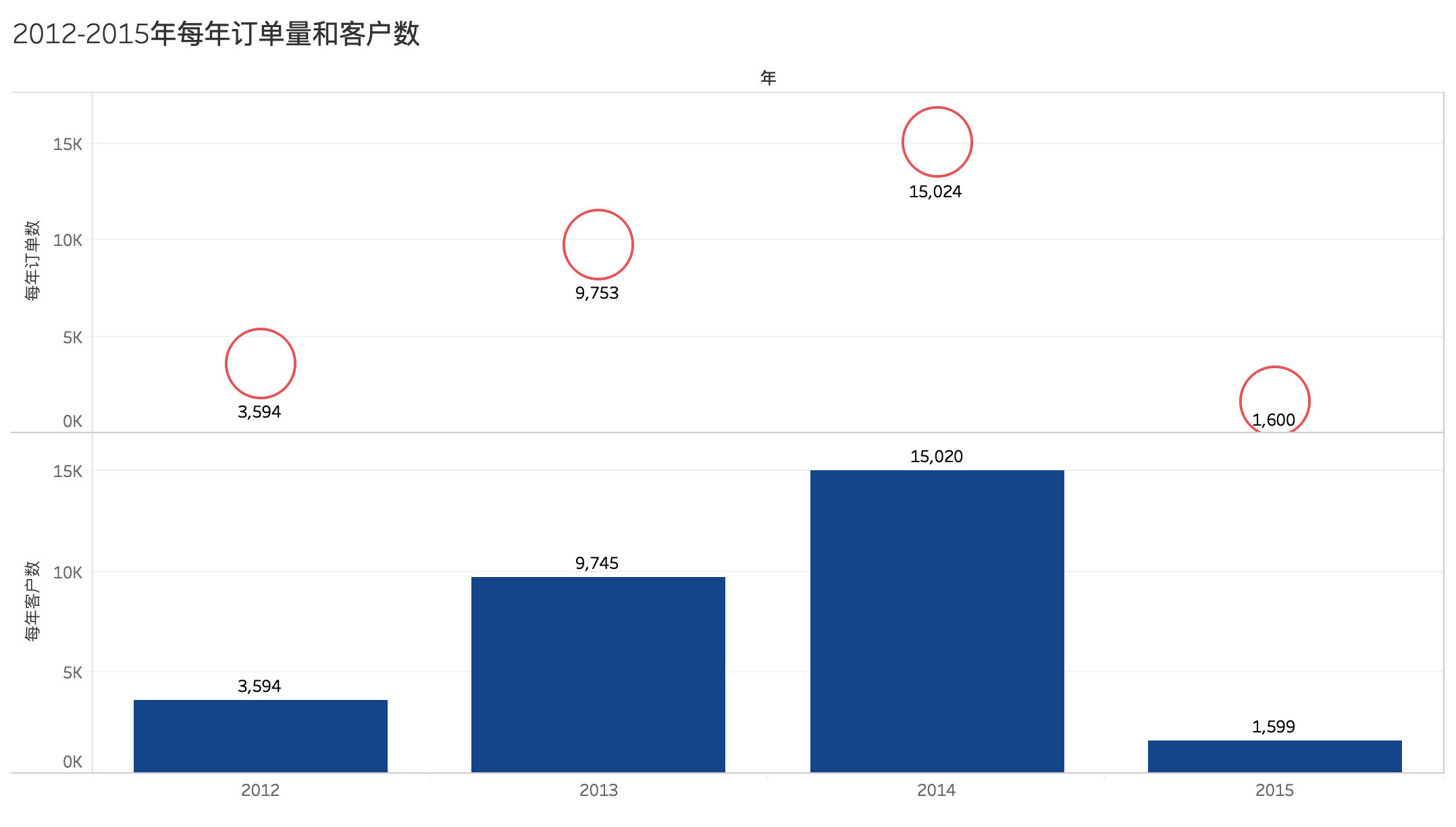
</code></pre>
<p><img src="https://hsiaopan.github.io/post-images/1591684871300.jpg" alt="" loading="lazy"><br>
根据2012年——2015年每年订单量柱形图，发现2014年全年订单量相较2013年增长超过50%。<br>
注：2012年和2015年数据不是全年数据，无法参与对比。</p>
<p>尝试通过<strong>PEST</strong>方法进行初步分析增长原因。<br>
<strong>PEST</strong>（Political、Economic、Social、Technological）分析模型是环境分析的一种方法，通过对政治、经济、社会、技术四方面的若干影响因素进行总结和列出相对关键和重要的影响因素。</p>
<ul>
<li><strong>政治因素</strong>：2013年12月28日，《关于调整完善生育政策的决议》通过，一方是独立子女的夫妇可生育两个孩子的单独二孩政策依法启动实施。政策的放宽，意味着符合条件的家庭可以生育二孩，对母婴市场是利好政策。</li>
<li><strong>经济因素</strong>：首先是中国人均GDP这几年稳步增长，国民的消费水平也同步提高；其次是2014年互联网企业赴美IPO，京东、阿里均在美国上市。</li>
<li><strong>社会因素</strong>：其一，国家对优生优育的宣传持续力度加大；其二，这几年新出生人口基数大，1600余万，且有小幅增长。</li>
<li><strong>技术因素</strong>：母婴产品多样化，这些都是技术进步带来的。</li>
</ul>
<p>从以上PEST模型中，对增长影响较大的因素，推断为政策因素（独立二孩）和社会因素（优生优育和人口基数大）。</p>
<h4 id="412-母婴行业的淡季和旺季">4.1.2 母婴行业的淡季和旺季</h4>
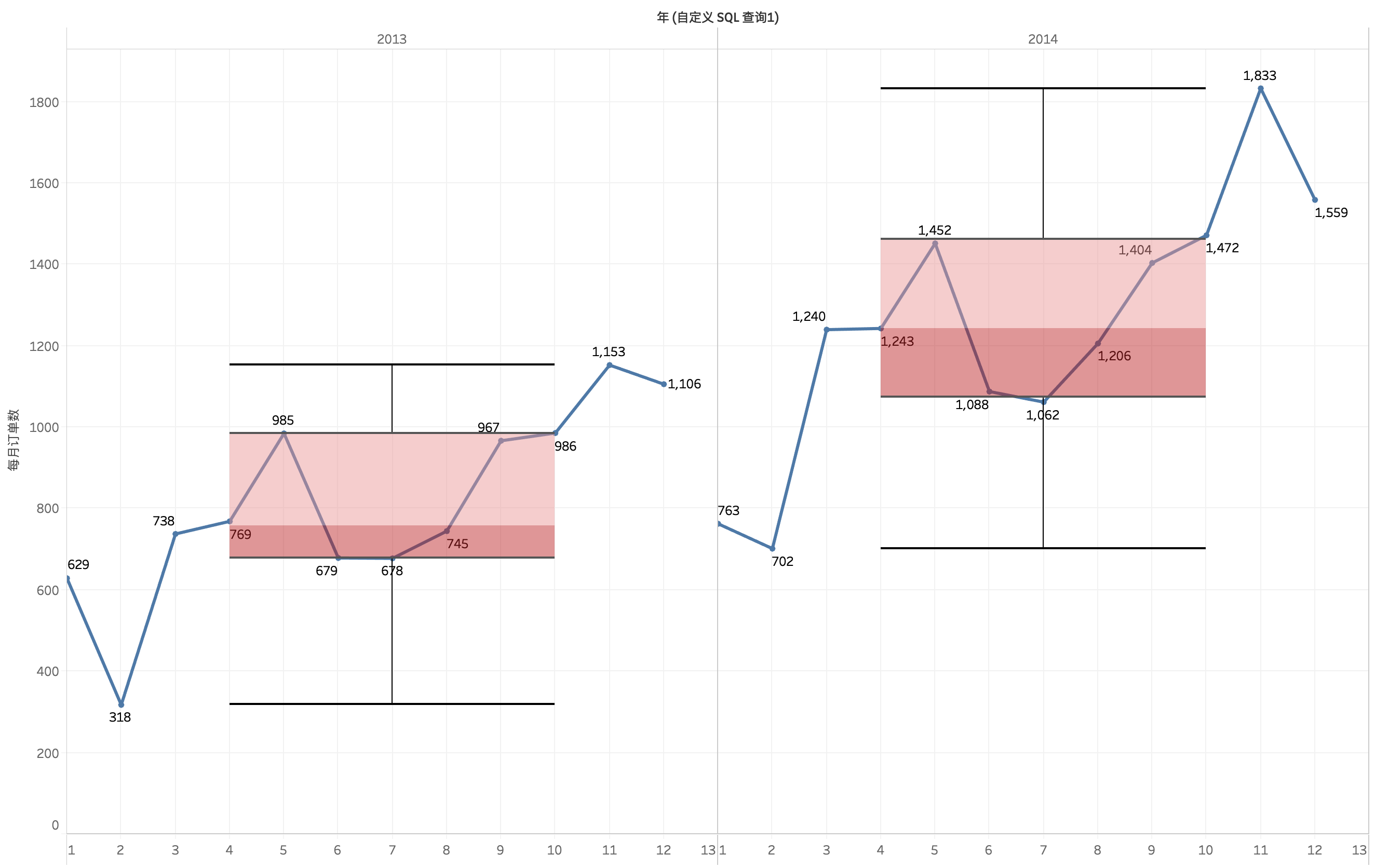
<p>取每月订单量进行对比</p>
<pre><code>SELECT
    count( DISTINCT user_id ) AS 每月客户数,
    count( * ) AS 每月订单数,
    extract( YEAR FROM `day` ) AS 年,
    extract( MONTH FROM `day` ) AS 月 
FROM
    trade_history
GROUP BY
    extract( YEAR FROM `day` ),
    extract( MONTH FROM `day` )
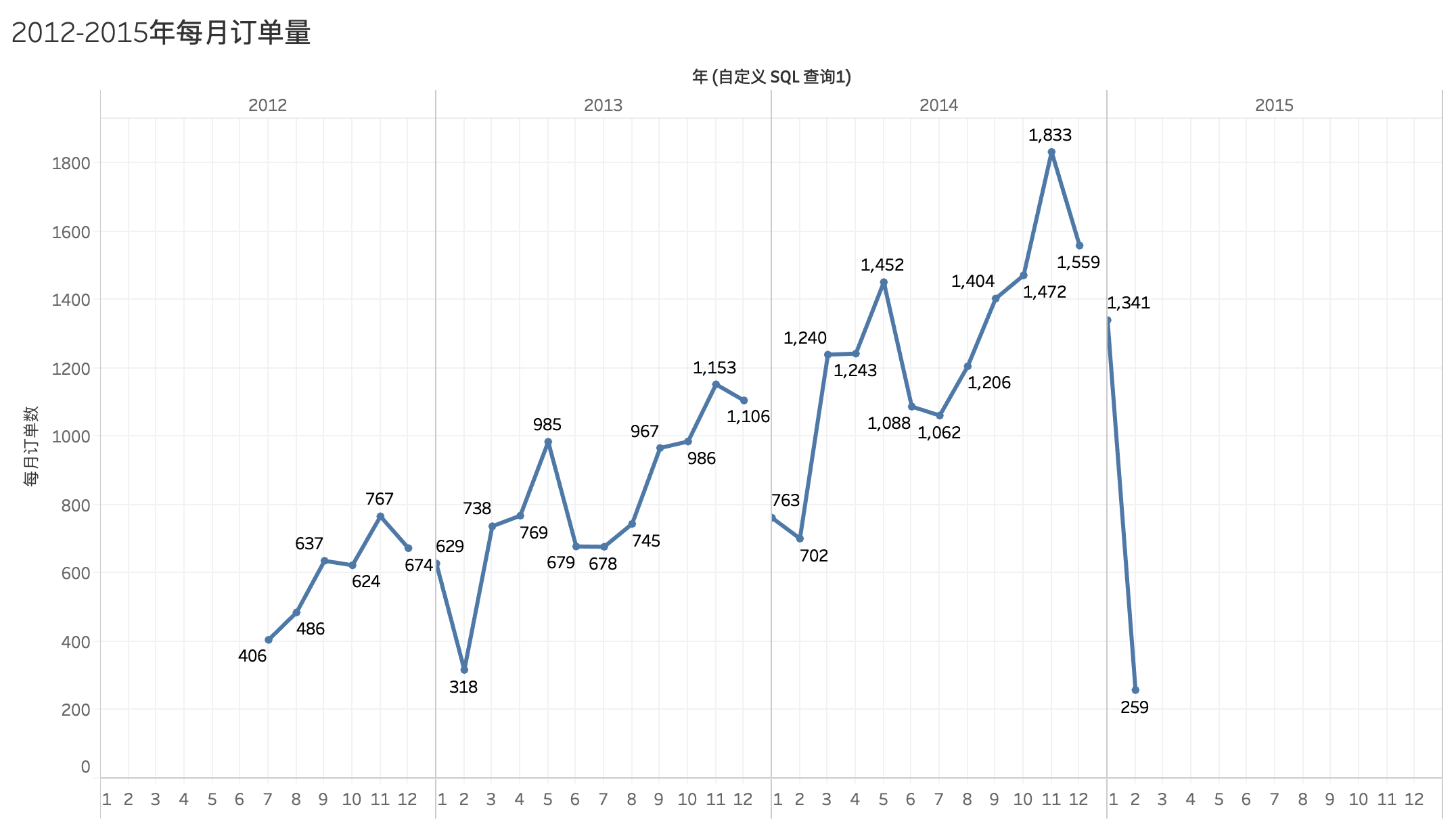
</code></pre>
<figure data-type="image" tabindex="1"><img src="https://hsiaopan.github.io/post-images/1591686131407.jpg" alt="" loading="lazy"></figure>
<p>根据月份统计订单量折线图，可以发现2013年与2014年趋势走向相似：<br>
* 3-5月、8-11月呈正增长<br>
* 6-7月、12-1月呈负增长<br>
其中2月年度最低点，11月达到峰值。<br>
筛选2013年和2014年，以订单量作盒须图，视订单量为前25%的月份为旺季，订单量后25%的月份为淡季<br>
<img src="https://hsiaopan.github.io/post-images/1591693119085.jpg" alt="" loading="lazy"><br>
* 旺季：10、11、12月<br>
* 淡季：1、2、7月</p>
<h4 id="413-top10消费日">4.1.3 Top10消费日</h4>
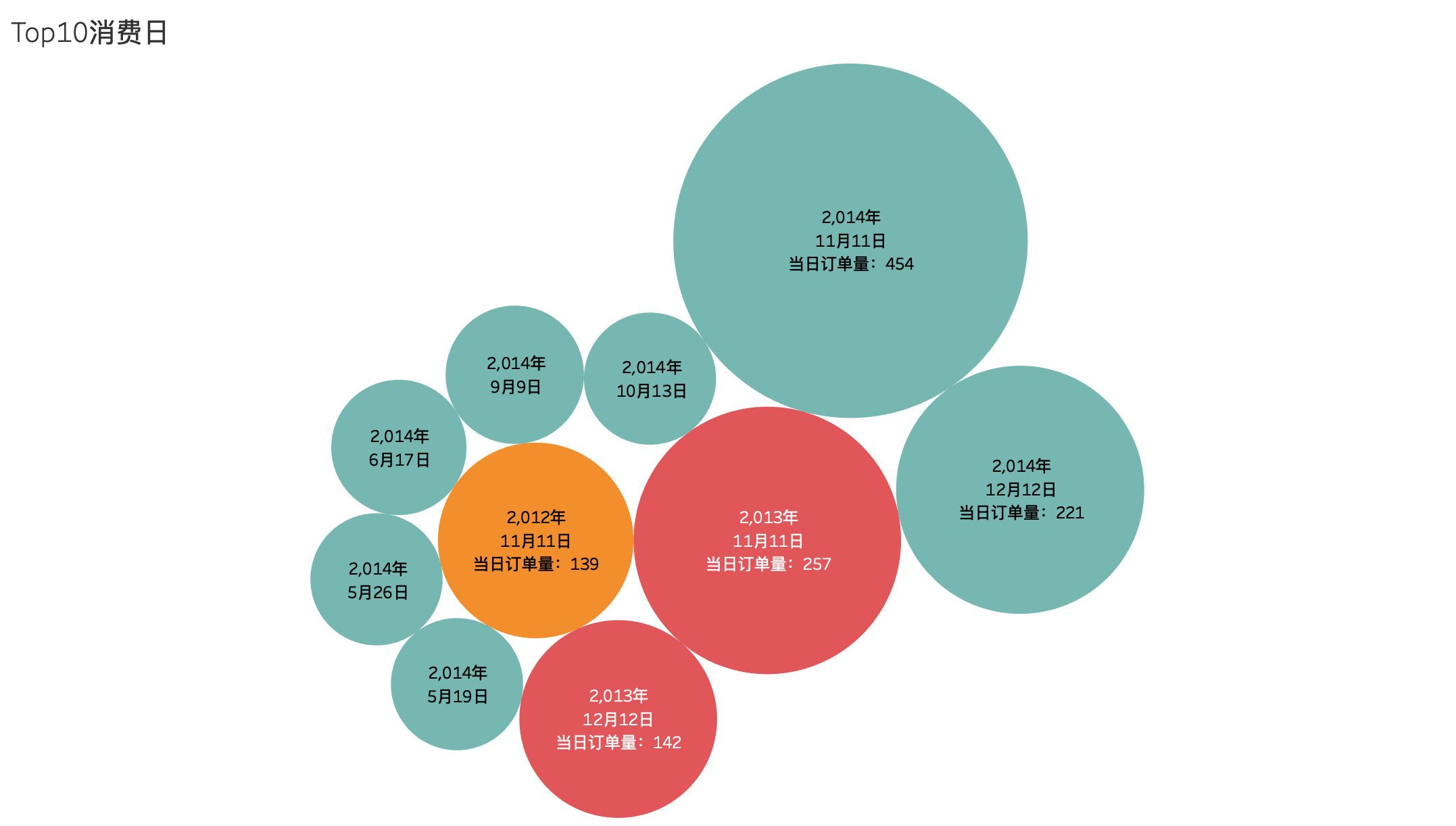
<p>提取订单量前十的日期</p>
<pre><code>SELECT
    EXTRACT( YEAR FROM `day` ) AS 年,
    EXTRACT( MONTH FROM `day` ) AS 月,
    EXTRACT( DAY FROM `day` ) AS 日,
    EXTRACT( * ) AS 每日订单数
FROM
    trade_history
GROUP BY
    EXTRACT( YEAR FROM `day` ),
    EXTRACT( MONTH FROM `day` ),
    EXTRACT( DAY FROM `day` ) 
ORDER BY
    COUNT( * ) DESC LIMIT 10
</code></pre>
<figure data-type="image" tabindex="2"><img src="https://hsiaopan.github.io/post-images/1591693705179.jpg" alt="" loading="lazy"></figure>
<p>从泡泡图可以看出，双十一单日销量最高，其次是双十二。<br>
没有看到2012年双十二，是因为双十二购物节始于2013年。</p>
<h4 id="414-全年订单量最低月份">4.1.4 全年订单量最低月份</h4>
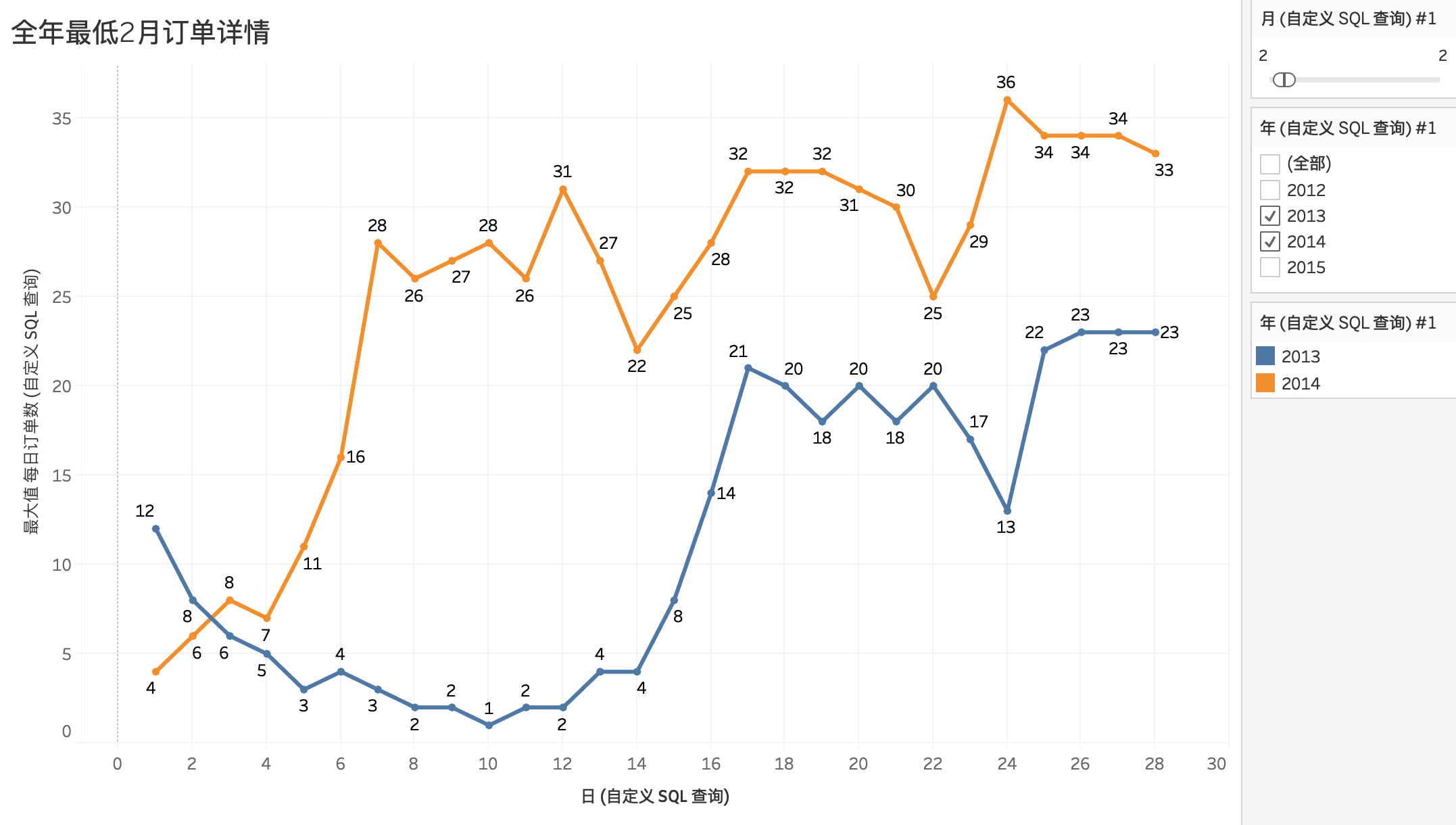
<p>筛选2013年2月和2014年2月每日订单量做折线图对比</p>
<figure data-type="image" tabindex="3"><img src="https://hsiaopan.github.io/post-images/1591694057164.jpg" alt="" loading="lazy"></figure>
<p>折线图呈现出该月每日订单量曲线在2013年和2014年差别很大，分析原因可能是过年期间全国放假时间不同导致。</p>
<blockquote>
<p>2013年的春节假期2月9日——2月15日，2014年春节假期1月30日——2月5日<br>
所以订单量下降到回升，是因为春节节前至春节期间全国放假，物流停运，节日之后复工，订单量上升。</p>
</blockquote>
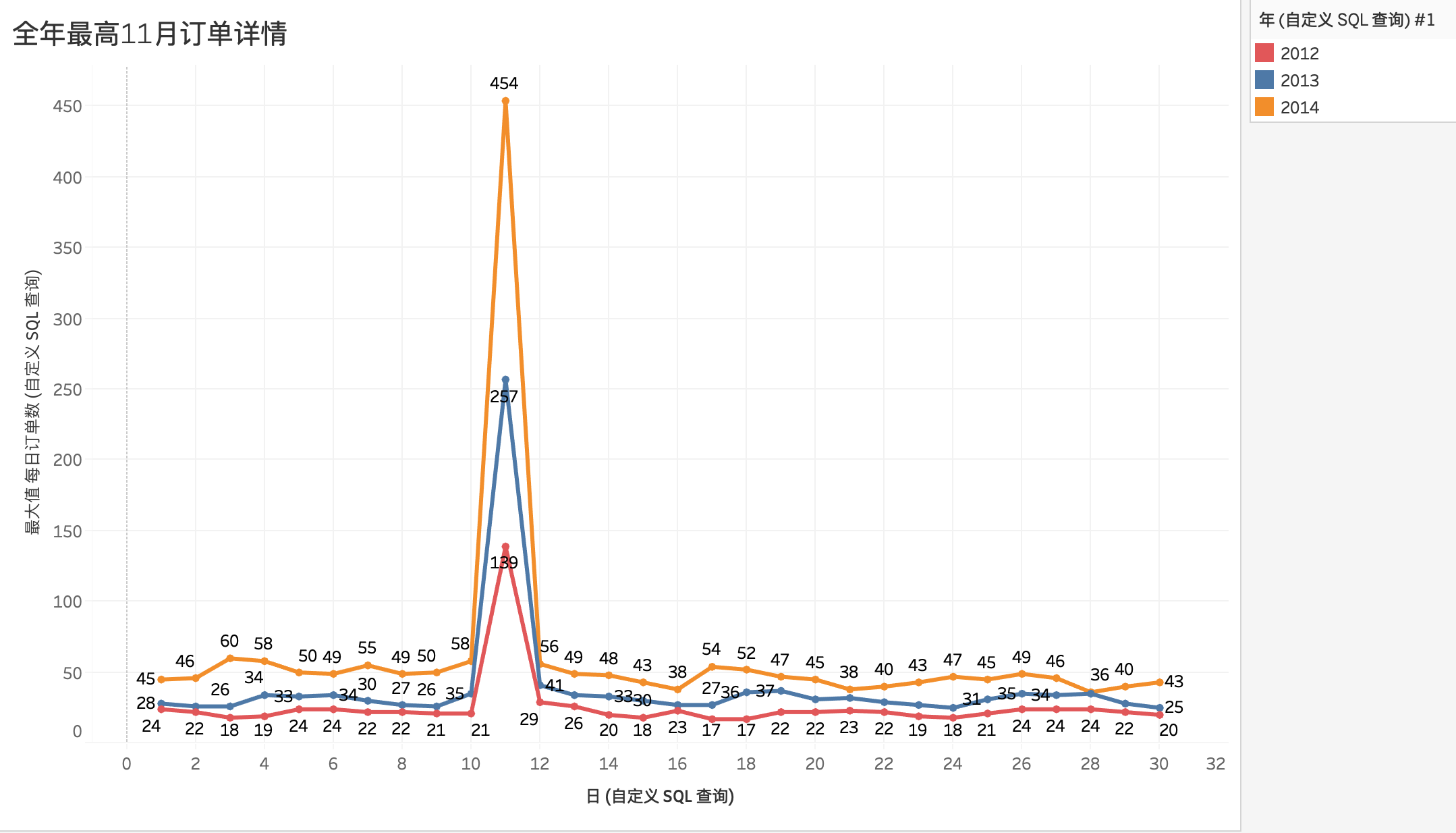
<h4 id="415-全年订单量最高月份">4.1.5 全年订单量最高月份</h4>
<p>筛选2012年、2013年、2014年的11月份做折线图对比<br>
<img src="https://hsiaopan.github.io/post-images/1591696703018.jpg" alt="" loading="lazy"></p>
<p>整个11月份的日订单量趋势特征非常明显，11.11日当日订单量占比整个11月总订单量20%左右，且比重逐年增加。说明双十一购物节受到广泛认同，且影响越来越大。</p>
<h3 id="42-客户价值分析">4.2 客户价值分析</h3>
<h4 id="421-用户回购率">4.2.1 用户回购率</h4>
<p>根据不同购买次数来统计客户量</p>
<pre><code>SELECT 
    COUNT(user_id) AS 购买次数,
    user_id
FROM
    trade_history
GROUP BY
    user_id
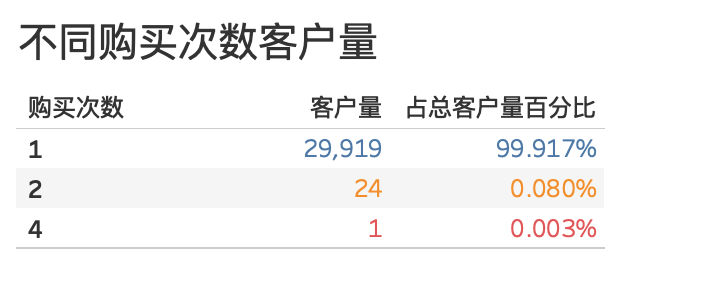
</code></pre>
<p><img src="https://hsiaopan.github.io/post-images/1591723173572.jpg" alt="" loading="lazy"><br>
只有25名客户有复购（购买次数大于1次）行为，回购率仅为0.083%，用户粘度极低。</p>
<h4 id="422-母婴市场主要消费人群">4.2.2 母婴市场主要消费人群</h4>
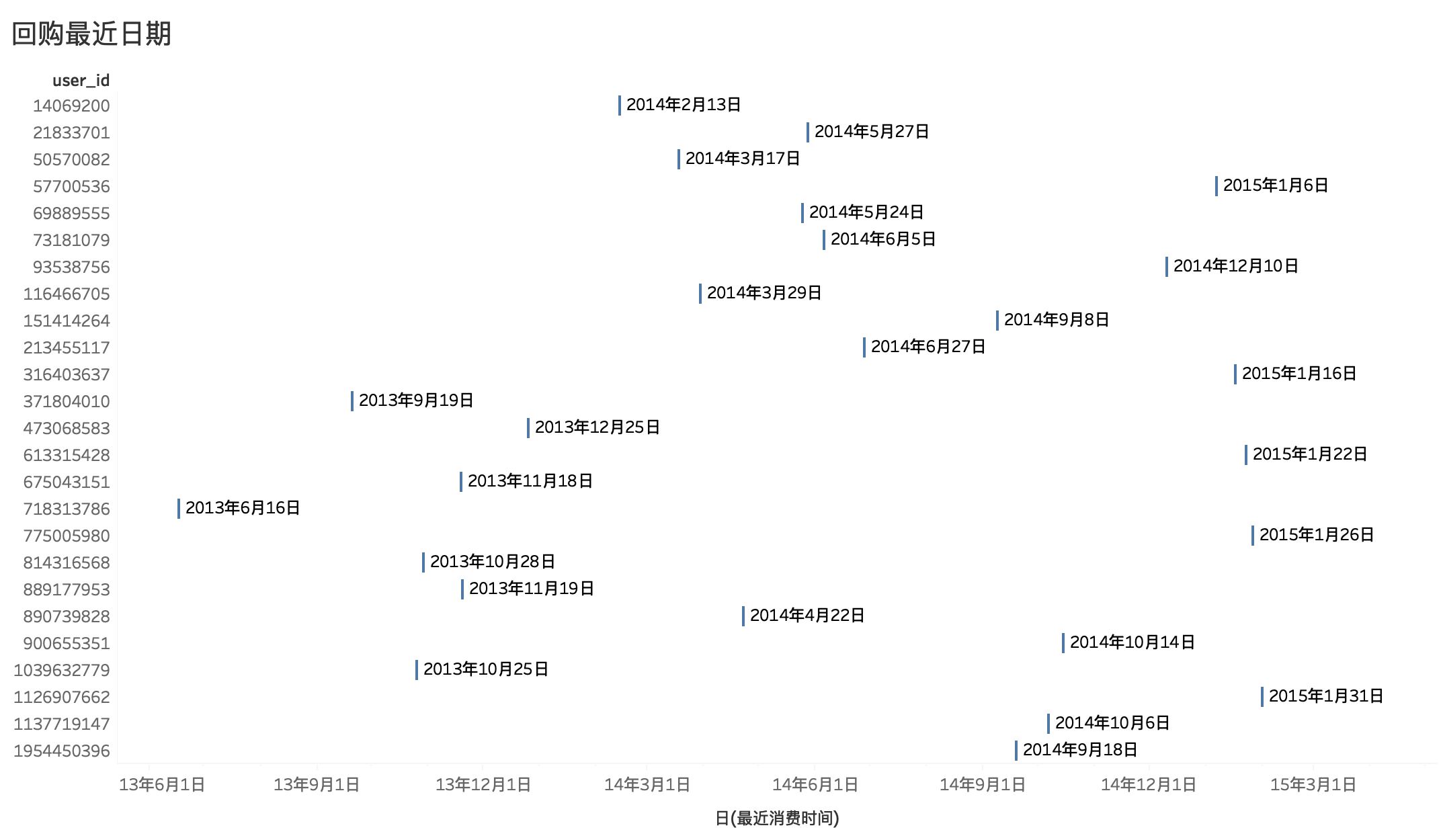
<p>根据有复购行为的客户最后一次消费时间节点，老客户订单量与当月订单量对比</p>
<ul>
<li>提取最近消费时间</li>
</ul>
<pre><code>SELECT
    user_id,
    MAX(`day`) AS 最近消费时间
FROM
    trade_history
GROUP BY
    user_id
ORDER BY
    MAX(`day`) DESC
</code></pre>
<ul>
<li>提取消费频次大于1的客户信息</li>
</ul>
<pre><code>SELECT 
    user_id
FROM
    trade_history
GROUP BY
    user_id
HAVING COUNT(user_id) &gt; 1
</code></pre>
<ul>
<li>将二者联接</li>
</ul>
<figure data-type="image" tabindex="4"><img src="https://hsiaopan.github.io/post-images/1591717427781.jpg" alt="" loading="lazy"></figure>
<p>前面的分析已经知道母婴产品市场的回购率很低，大部分客户都是一次消费。在有回购的客户中，有5名客户在2015年1月进行了复购，而当月总计客户数为1314位，由此看出母婴市场主要还是依靠源源不断的新客户。</p>
<h3 id="43-用户指标">4.3 用户指标</h3>
<p>将 <code>baby_birthday</code> 与 <code>trade_history</code> 表联结</p>
<blockquote>
<p>前面提到婴儿生日性别表里有 <code>gender</code> 为 <strong>2</strong> 的数据，此处将其剔除，选用剔除之后的婴儿生日性别表 <code>baby_birthday</code></p>
</blockquote>
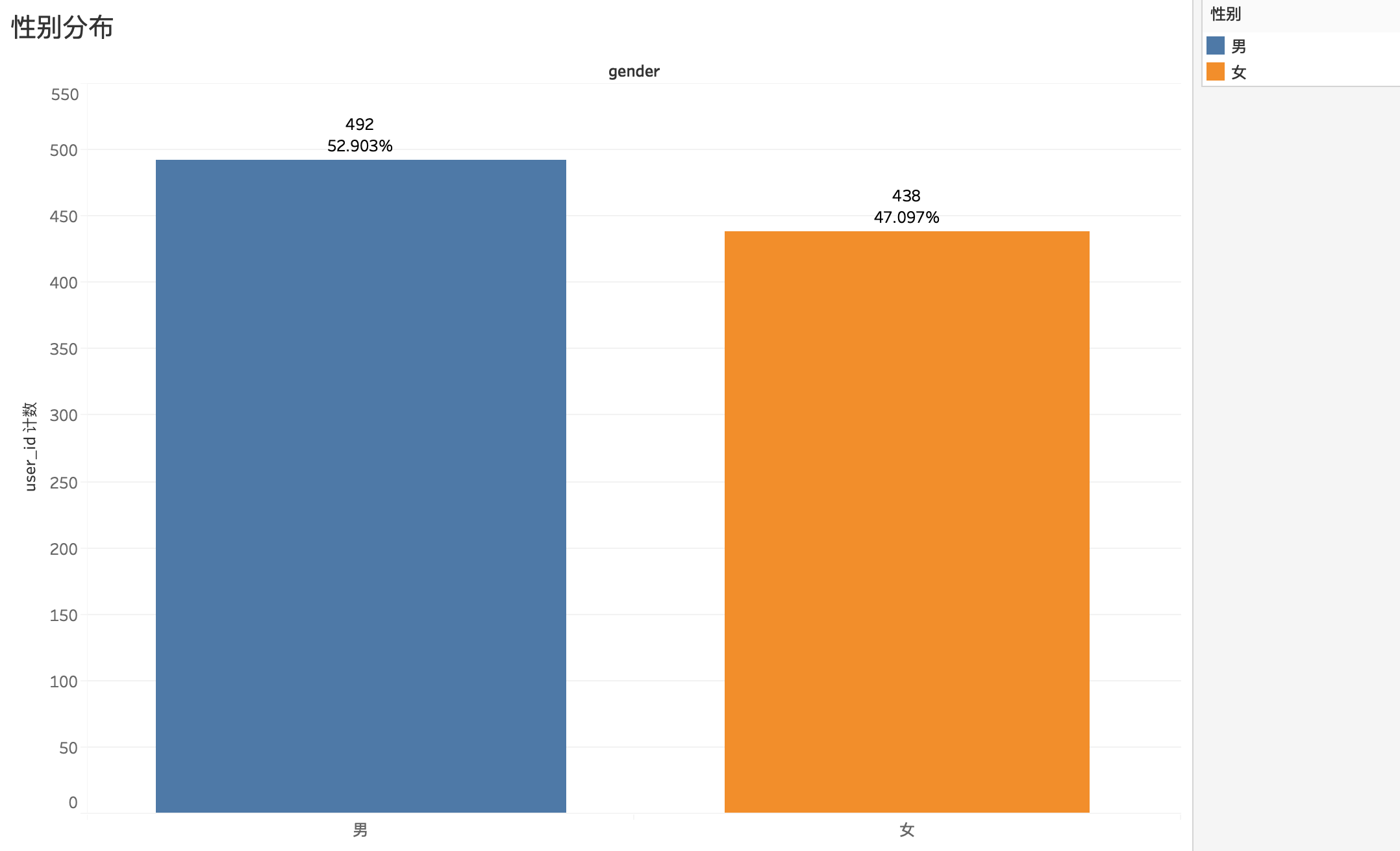
<h4 id="431-用户性别对比">4.3.1 用户性别对比</h4>
<p><img src="https://hsiaopan.github.io/post-images/1591762832195.jpg" alt="" loading="lazy"><br>
930个用户中，男女比例差距很小，男生比例只比女生多6%</p>
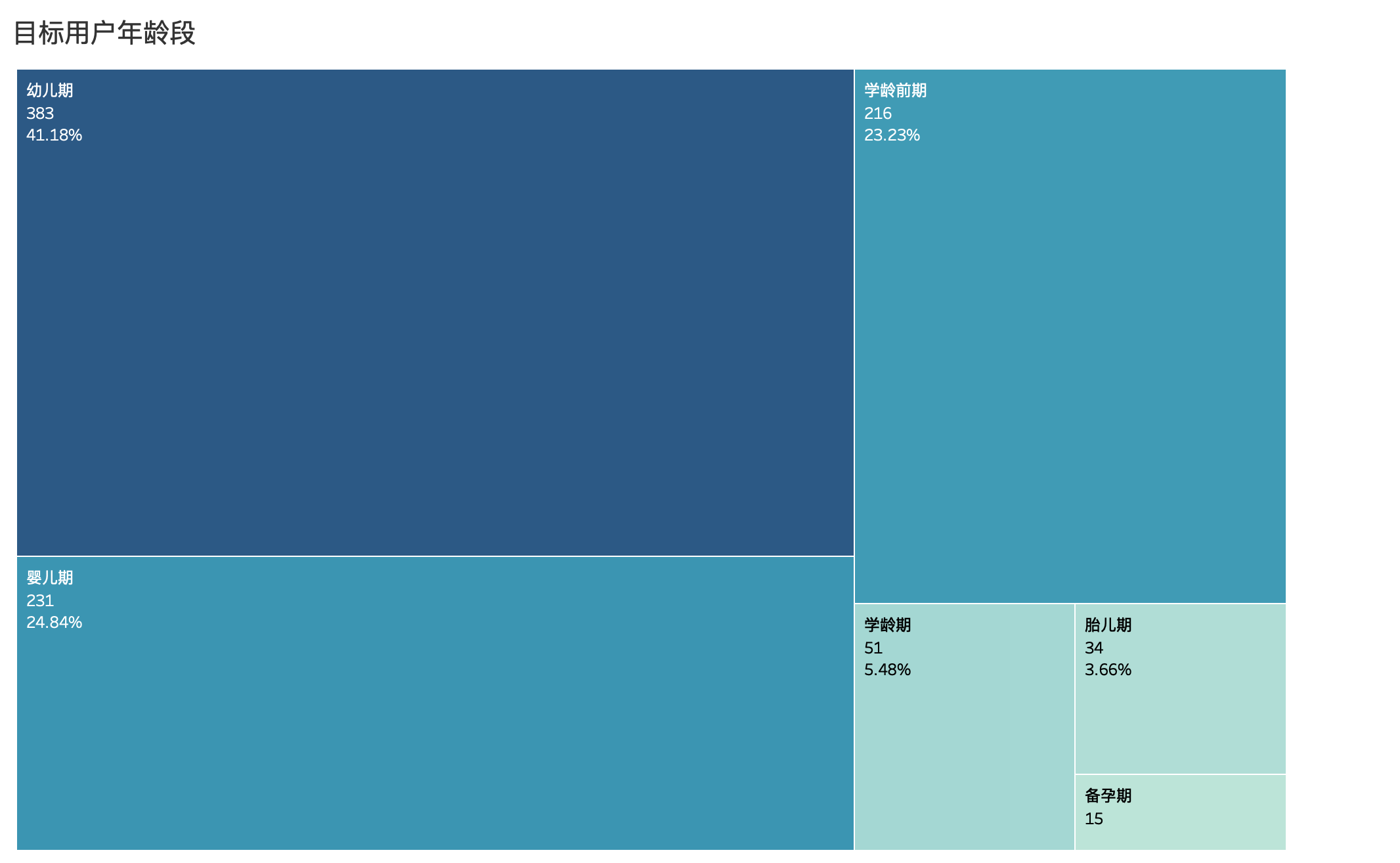
<h4 id="432-目标用户年龄段">4.3.2 目标用户年龄段</h4>
<p>将用户根据年龄分成6个阶段，在Tableau里新建度量命名 <code>年龄段</code>：</p>
<pre><code>IF (DATEDIFF('year',[birthday],[day])) &gt;= 6 THEN '学龄期'
ELSEIF (DATEDIFF('year',[birthday],[day])) &gt;= 3  THEN '学龄前期'
ELSEIF (DATEDIFF('year',[birthday],[day])) &gt;= 1  THEN '幼儿期'
ELSEIF (DATEDIFF('year',[birthday],[day])) &gt;= 0  THEN '婴儿期'
ELSEIF (DATEDIFF('month',[birthday],[day])) &gt;= -10 THEN '胎儿期'
ELSE '备孕期'
END
</code></pre>
<figure data-type="image" tabindex="5"><img src="https://hsiaopan.github.io/post-images/1591763253106.jpg" alt="" loading="lazy"></figure>
<p>可以看出婴儿期和幼儿期，既0-3岁的宝宝是母婴市场占比最大的用户群。有一部分客户在婴儿未出生就开始准备母婴用品，3岁之后需求量开始下降。</p>
<h3 id="44-商品类指标">4.4 商品类指标</h3>
<h4 id="441-商品特征">4.4.1 商品特征</h4>
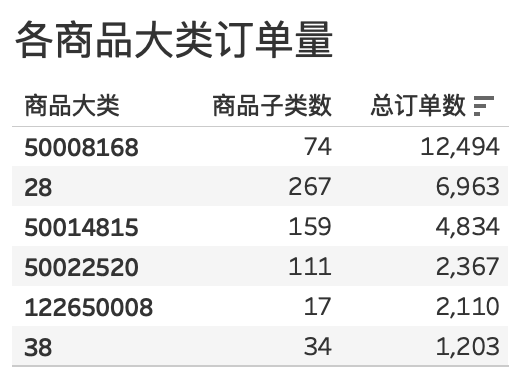
<p>添加新自定义SQL，提取每个商品大类对应商品子类数量，</p>
<pre><code>SELECT
    cat1 '商品大类',
    COUNT(distinct cat_id) '子类数量'
FROM
    trade_history
GROUP BY
    cat1
</code></pre>
<p>添加自定义SQL，提取商品大类对应订单量</p>
<pre><code>SELECT
    cat1 '商品大类',
    COUNT(cat1) '大类订单量'
FROM
    trade_history
GROUP BY
    cat1
</code></pre>
<p>为了获取每个商品大类下子类的订单量，需要再添加 <code>trade——history</code>，将他们联结<br>
<img src="https://hsiaopan.github.io/post-images/1591775745136.jpg" alt="" loading="lazy"></p>
<figure data-type="image" tabindex="6"><img src="https://hsiaopan.github.io/post-images/1591774885749.jpg" alt="" loading="lazy"></figure>
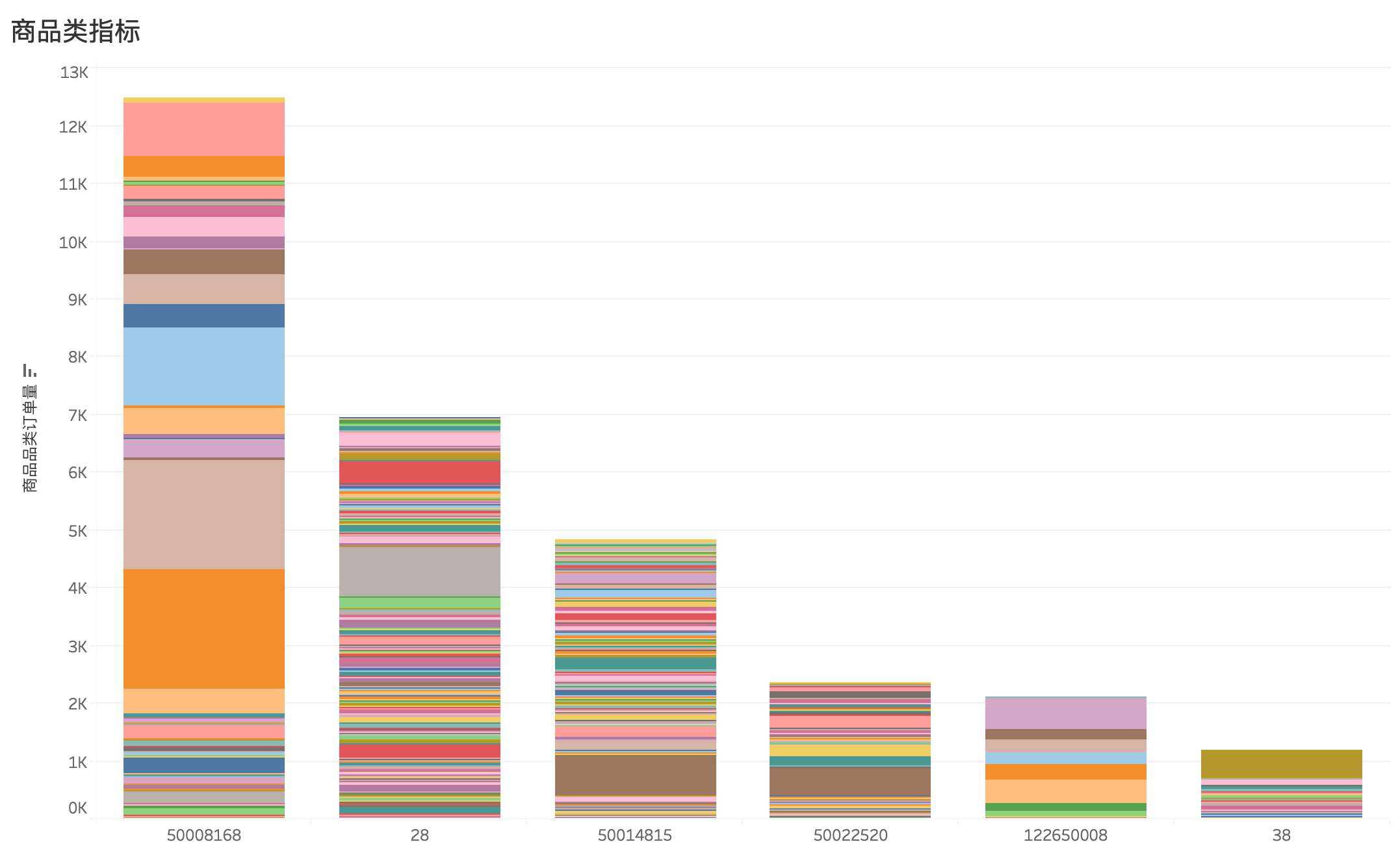
<p>根据上表数据和条形图，可以发现商品特征如下：</p>
<ul>
<li>销量最好，产品种类一般：<code>5008168</code></li>
<li>销量一般，产品种类丰富：<code>28</code>、<code>50014815</code></li>
<li>销量较低，产品种类丰富：<code>50022520</code></li>
<li>销量极低，产品种类较少：<code>122650008</code>、<code>38</code></li>
</ul>
<p><img src="https://hsiaopan.github.io/post-images/1591774897592.jpg" alt="" loading="lazy"><br>
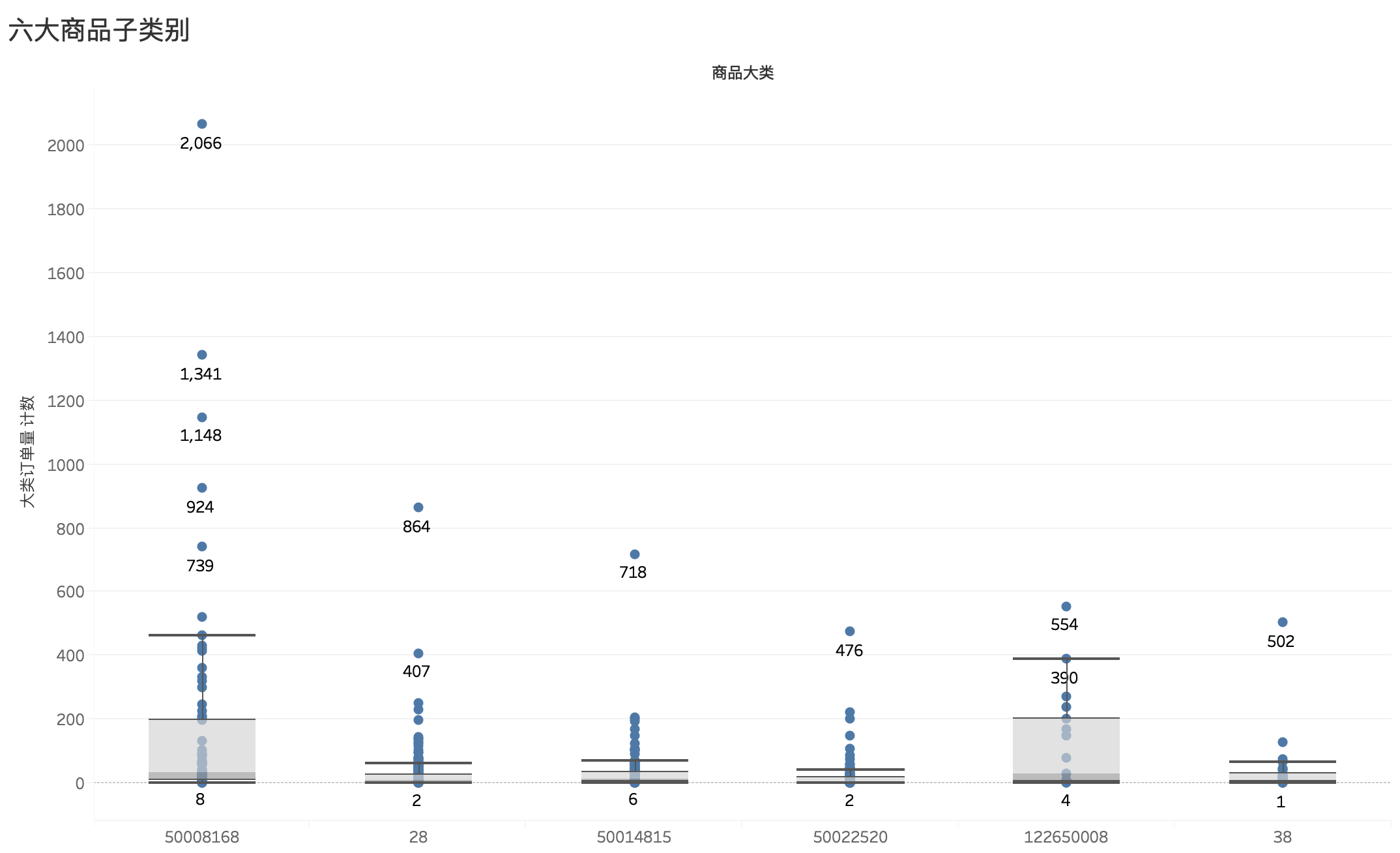
根据上面各类商品及子类订单量条形图绘制的箱线图，以此箱线图可知：</p>
<ul>
<li>商品大类 <code>5008168</code> 的中位数仅为33，但由于6款爆款产品以及销量大部分高于中位数的商品，使得 <code>5008168</code> 的总体销量位居第一</li>
<li>商品大类 <code>28</code> 的中位数更低，仅为8，且聚集度高，说明大量的产品销量不好，使得该类产品总体单量表现一般</li>
<li>商品大类 <code>50014815</code> 中位数为12，情况与 <code>28</code> 类似。</li>
<li>商品大类 <code>50022520</code> 中位数为5，且聚集度高，且无表现突出产品，但因种类繁多，总体单量变现不至于最差</li>
<li>商品大类 <code>122650008</code> 中位数为30，上四分位达到203，超过总体销量排名第一的 <code>5008168</code>，可以看出前25%得商品在婴幼儿市场中的受欢迎程度很高，但因产品种类少，虽然总体单量表现不佳</li>
<li>商品大类 <code>122650008</code> 中位数仅为9，且聚集度高，而且产品种类少，其中单子类 <code>211122</code> 达到该类别总量的41.73%</li>
</ul>
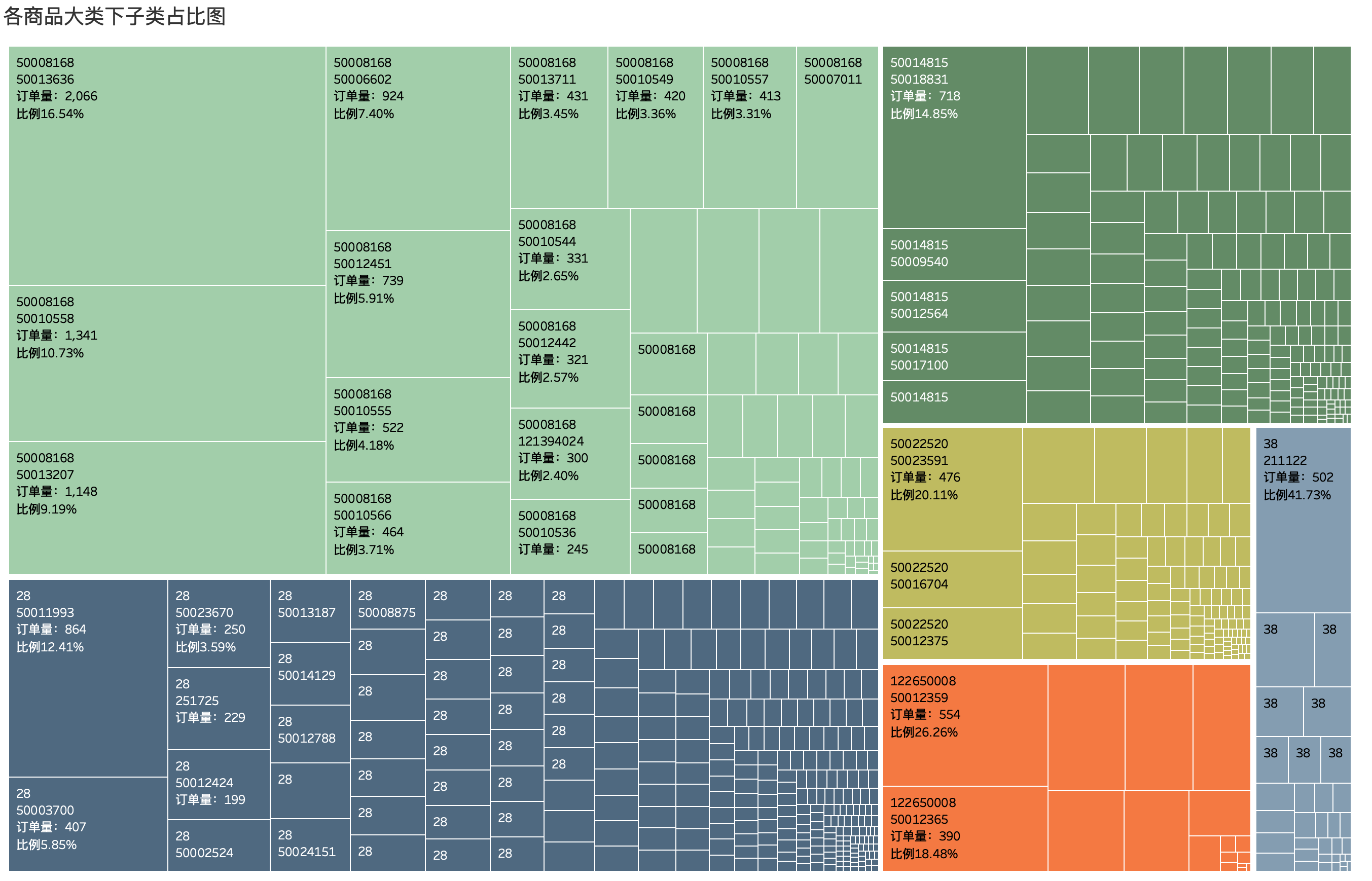
<h4 id="442-最受欢迎的商品">4.4.2 最受欢迎的商品</h4>
<p>根据各个商品大类，分别选出最受欢迎产品，可以通过树状图展示<br>
<img src="https://hsiaopan.github.io/post-images/1591781647428.jpg" alt="" loading="lazy"></p>
<h2 id="5-总结">5 总结</h2>
<ul>
<li>互联网时代大背景下，电商平台为人们购物选择提供了极大便利，技术进步为产品的更迭创新提供支撑，优生优育的观念之下，母婴产品的需求变得大且广，仅2014年对比2013年，订单量即完成了50%以上的增长</li>
<li>每年10-12月为母婴行业的旺季，购物节（双十一、双十二）尤为火爆，卖家需要针对这段时间指定相应的活动方案，并且提前预热宣传，提升店铺曝光量，吸纳更多新客户</li>
<li>在长达两年半的时间段内，仅有回购客户占比不足0.1%，说明母婴行业内客户粘性非常低，针对这一现象，可进行两方面准备：其一，通过一些手段，诸如会员制、积分制、累积购物优惠、分享或邀请有礼等方式是新客户变成老客户，突破二次消费；其二，服从客观规律，加大曝光率，吸引更多的新客户</li>
<li>0-3岁的宝宝是母婴市场占比最大的用户群，增加在这个客户群体对应产品的开发，进一步提升客户消费量</li>
<li>每种品类里都有爆款产品，销售量都远比同类其他产品高，可以尝试多打造爆款，提升整个品类的销量。</li>
</ul>
<!-- more -->
<p>『此文复现 https://zhuanlan.zhihu.com/p/68105677 侵删』</p>
]]></content>
    </entry>
    <entry>
        <title type="html"><![CDATA[MySQL导入数据 Data too long for column]]></title>
        <id>https://hsiaopan.github.io/post/MySQL_ERR_1406/</id>
        <link href="https://hsiaopan.github.io/post/MySQL_ERR_1406/">
        </link>
        <updated>2020-05-20T10:14:36.000Z</updated>
        <summary type="html"><![CDATA[<p>太长不看版本：Terminal连接进MySQL之后 <code>set @@global.sql_mode='';</code>，解忧。</p>
]]></summary>
        <content type="html"><![CDATA[<p>太长不看版本：Terminal连接进MySQL之后 <code>set @@global.sql_mode='';</code>，解忧。</p>
<h2 id="-more-"><!-- more --></h2>
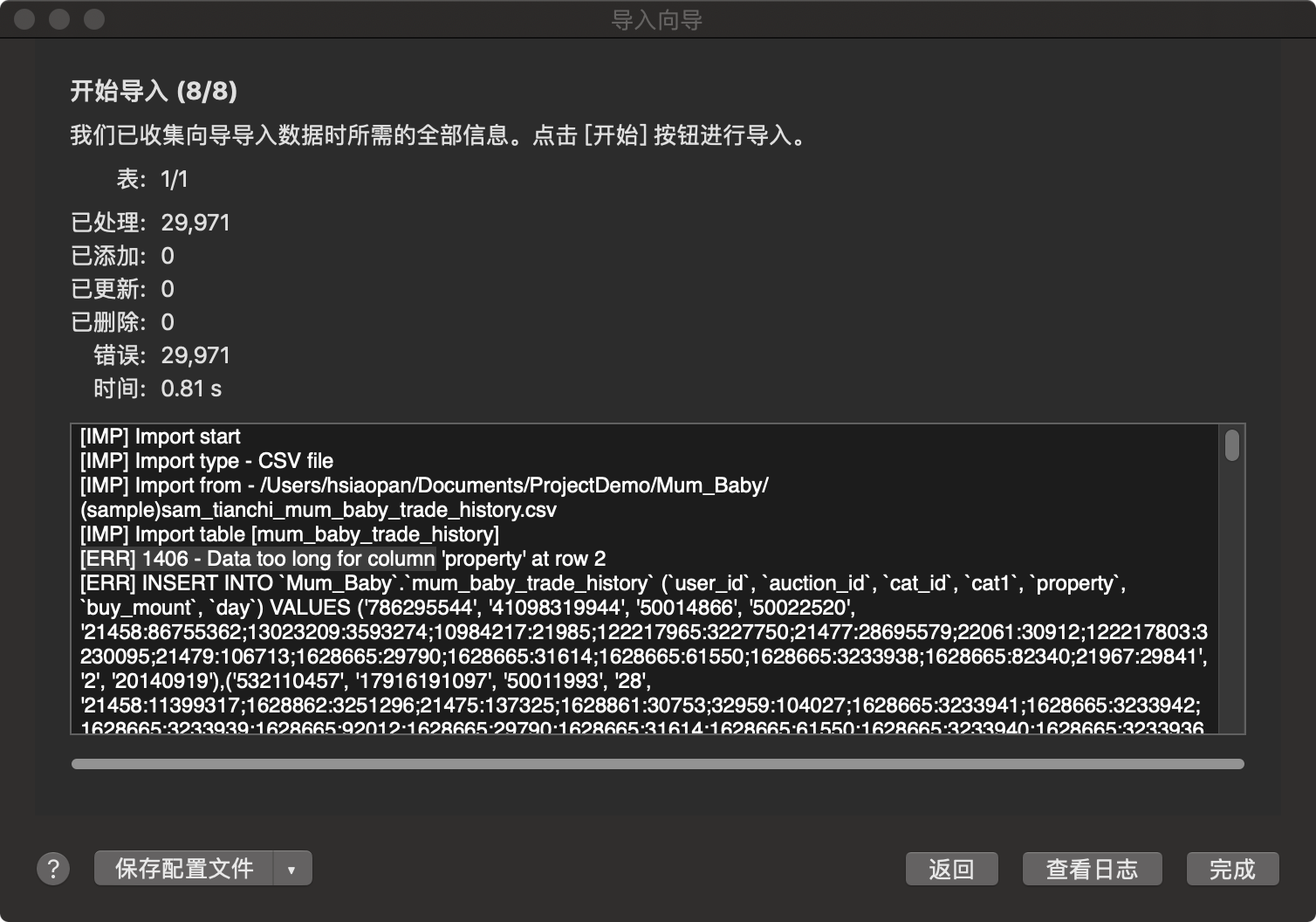
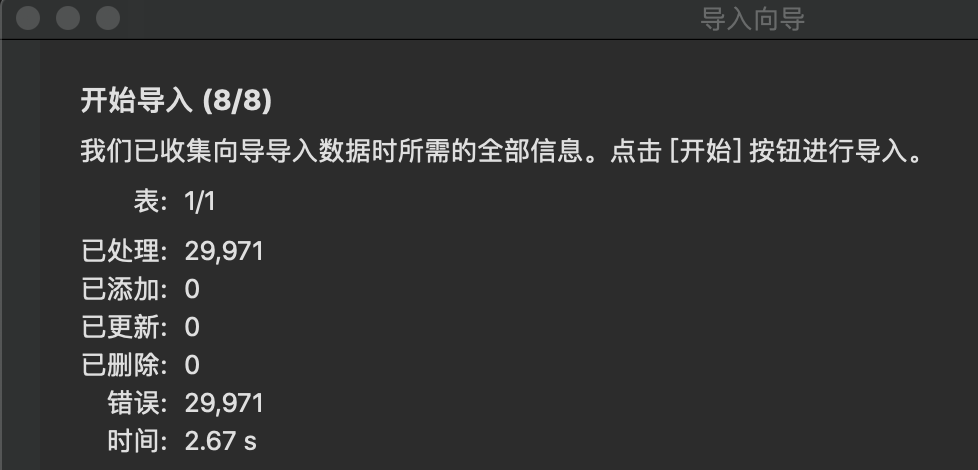
<p>在Navicat中给MySQL导入数据时，遇上失败，细查报错原因，发现有这么一行提示：<br>
<code>[ERR] 1406 - Data too long for column 'property' at row 2</code><br>
<img src="https://hsiaopan.github.io/post-images/1591179692585.jpg" alt="" loading="lazy"></p>
<p>嗯...太长，怎么办？🤔<br>
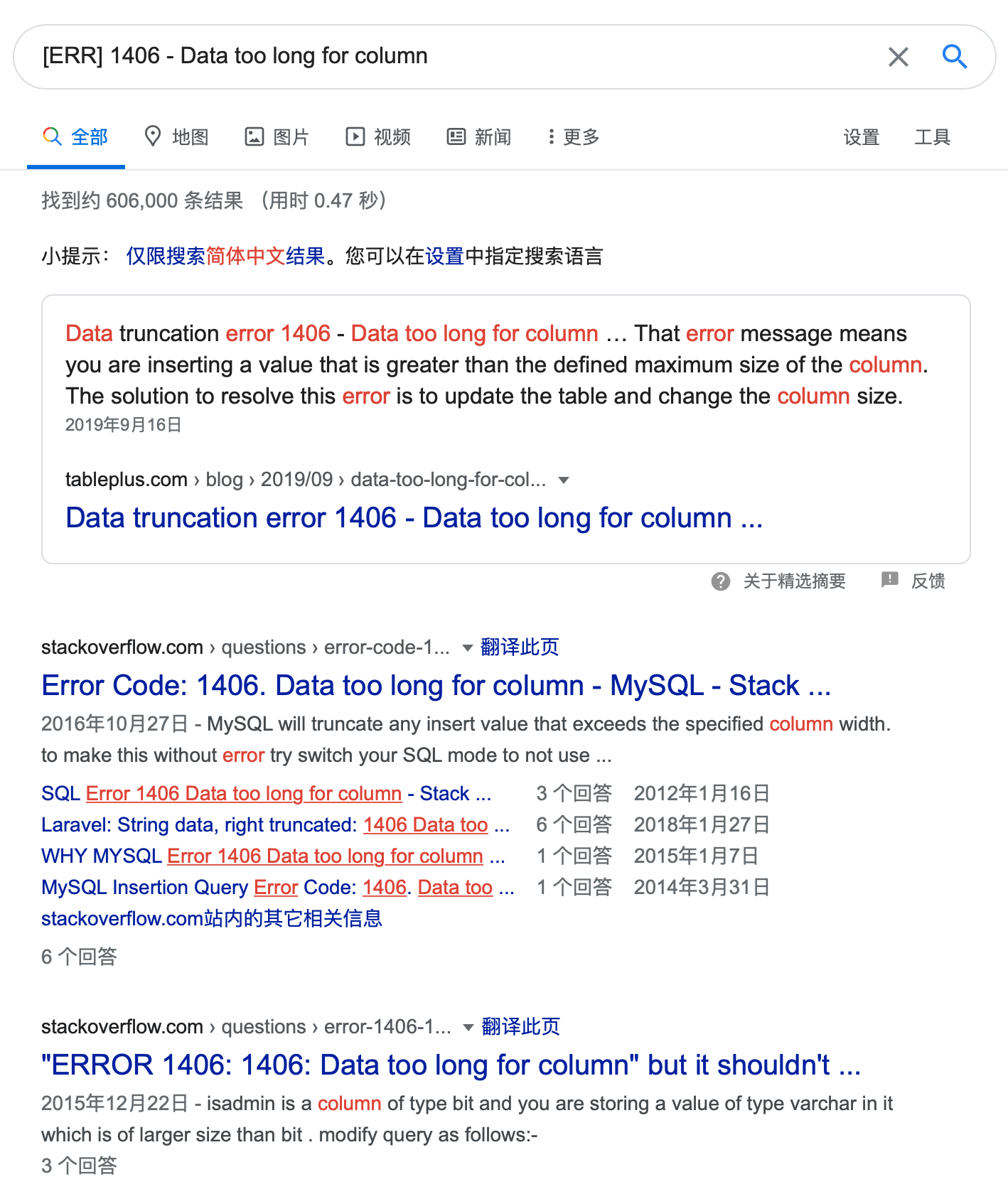
老样子，把关键句子拷贝出来放搜索引擎里检索一下...</p>
<figure data-type="image" tabindex="1"><img src="https://hsiaopan.github.io/post-images/1591180272932.jpg" alt="" loading="lazy"></figure>
<p>出现相同问题的人还挺多，搜索结果都有60万条...<br>
查看几个结果之后，发现解决办法大同小异，核心思路是一样的：</p>
<p><strong>修改sql_mode，关闭STRICT模式</strong></p>
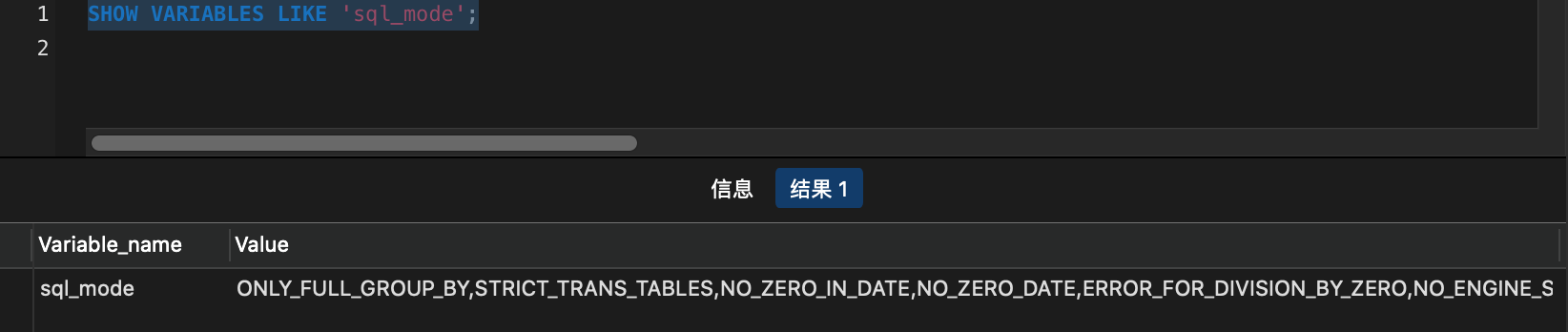
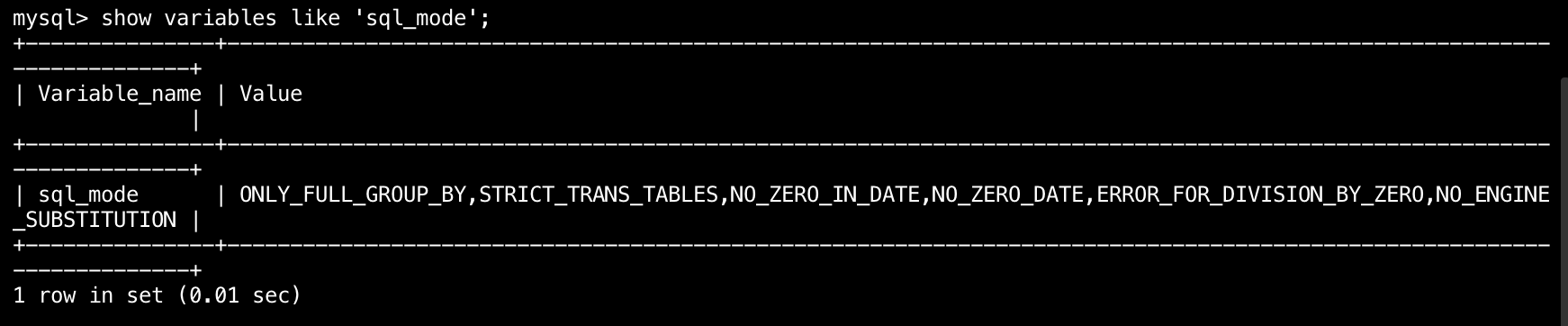
<p>开始修改之前，先查看下目前启用的什么模式</p>
<pre><code>SHOW VARIABLES LIKE 'sql_mode'; 
</code></pre>
<figure data-type="image" tabindex="2"><img src="https://hsiaopan.github.io/post-images/1591181903181.jpg" alt="" loading="lazy"></figure>
<p>看到了<code>STRICT_TRANS_TABLES</code>（<em><strong>存储引擎启用严格模式，非法数据值被拒绝</strong></em>），按照之前找到的方法，这时候我只要关闭这个模式就OK了😬</p>
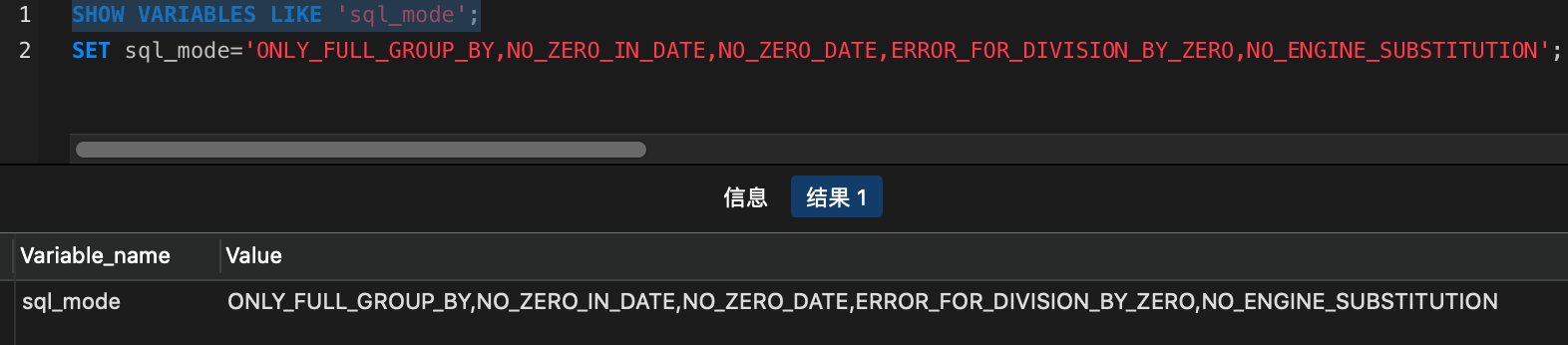
<pre><code>SET sql_mode='ONLY_FULL_GROUP_BY,NO_ZERO_IN_DATE,NO_ZERO_DATE,ERROR_FOR_DIVISION_BY_ZERO,NO_ENGINE_SUBSTITUTION';
</code></pre>
<figure data-type="image" tabindex="3"><img src="https://hsiaopan.github.io/post-images/1591182228887.jpg" alt="" loading="lazy"></figure>
<p>查看下当前什么模式<br>
<code>SHOW VARIABLES LIKE 'sql_mode';</code><br>
<img src="https://hsiaopan.github.io/post-images/1591182315250.jpg" alt="" loading="lazy"></p>
<p>看起来没问题😬<br>
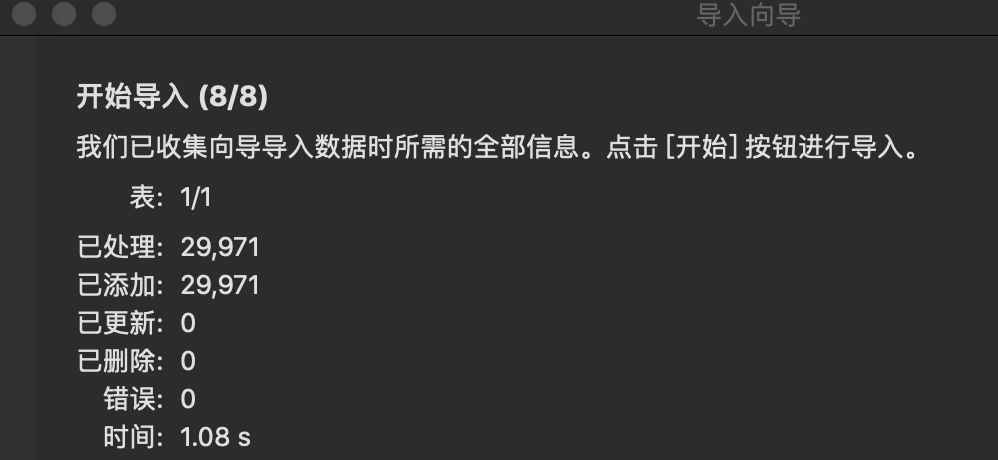
接着重新导入数据再看<br>
<img src="https://hsiaopan.github.io/post-images/1591182527007.jpg" alt="" loading="lazy"></p>
<p>😐没成功！？</p>
<p>我陷入了沉思....</p>
<p>换个地方试试？</p>
<p>我打开<strong>Hyper</strong>（<em><strong>一款Terminal工具</strong></em>）</p>
<pre><code>mysql -u root -p
</code></pre>
<pre><code>show variables like 'sql_mode';
</code></pre>
<figure data-type="image" tabindex="4"><img src="https://hsiaopan.github.io/post-images/1591182949678.jpg" alt="" loading="lazy"></figure>
<p>wtf？😭<br>
果然之前操作的没有成功，才导致导入数据失败！</p>
<p>马不停蹄</p>
<pre><code>set sql_mode='ONLY_FULL_GROUP_BY,NO_ZERO_IN_DATE,NO_ZERO_DATE,ERROR_FOR_DIVISION_BY_ZERO,NO_ENGINE_SUBSTITUTION';
</code></pre>
<p>再次检查一下模式是否设置成功</p>
<figure data-type="image" tabindex="5"><img src="https://hsiaopan.github.io/post-images/1591183197489.jpg" alt="" loading="lazy"></figure>
<p>ok！返回去重新导入数据，还是失败，模式修改不是全局的缘故？🤔<br>
重新设置模式</p>
<pre><code>set @@global.sql_mode='ONLY_FULL_GROUP_BY,NO_ZERO_IN_DATE,NO_ZERO_DATE,ERROR_FOR_DIVISION_BY_ZERO,NO_ENGINE_SUBSTITUTION';
</code></pre>
<figure data-type="image" tabindex="6"><img src="https://hsiaopan.github.io/post-images/1591183518960.jpg" alt="" loading="lazy"></figure>
<p>终于成功了😭</p>
<p>愿所有人少走无谓的弯路。</p>
]]></content>
    </entry>
    <entry>
        <title type="html"><![CDATA[Excel数据分析——以招聘数据为例]]></title>
        <id>https://hsiaopan.github.io/post/Data_Analysis_of_Job_Information_by_Excel/</id>
        <link href="https://hsiaopan.github.io/post/Data_Analysis_of_Job_Information_by_Excel/">
        </link>
        <updated>2020-05-10T14:04:45.000Z</updated>
        <summary type="html"><![CDATA[<p>以某招聘网站的数据分析师招聘信息为样本数据，选取一个角度进行分析。熟悉使用Excel进行数据分析的基本步骤和常见操作</p>
]]></summary>
        <content type="html"><![CDATA[<p>以某招聘网站的数据分析师招聘信息为样本数据，选取一个角度进行分析。熟悉使用Excel进行数据分析的基本步骤和常见操作</p>
<!-- more -->
<h2 id="前言">前言</h2>
<hr>
<p><em>明确总体目的</em>：<br>
以某招聘网站的数据分析师岗位的招聘信息为数据基础，探索不同城市数据分析师需求特点以及薪资情况。</p>
<h2 id="分析前准备">分析前准备</h2>
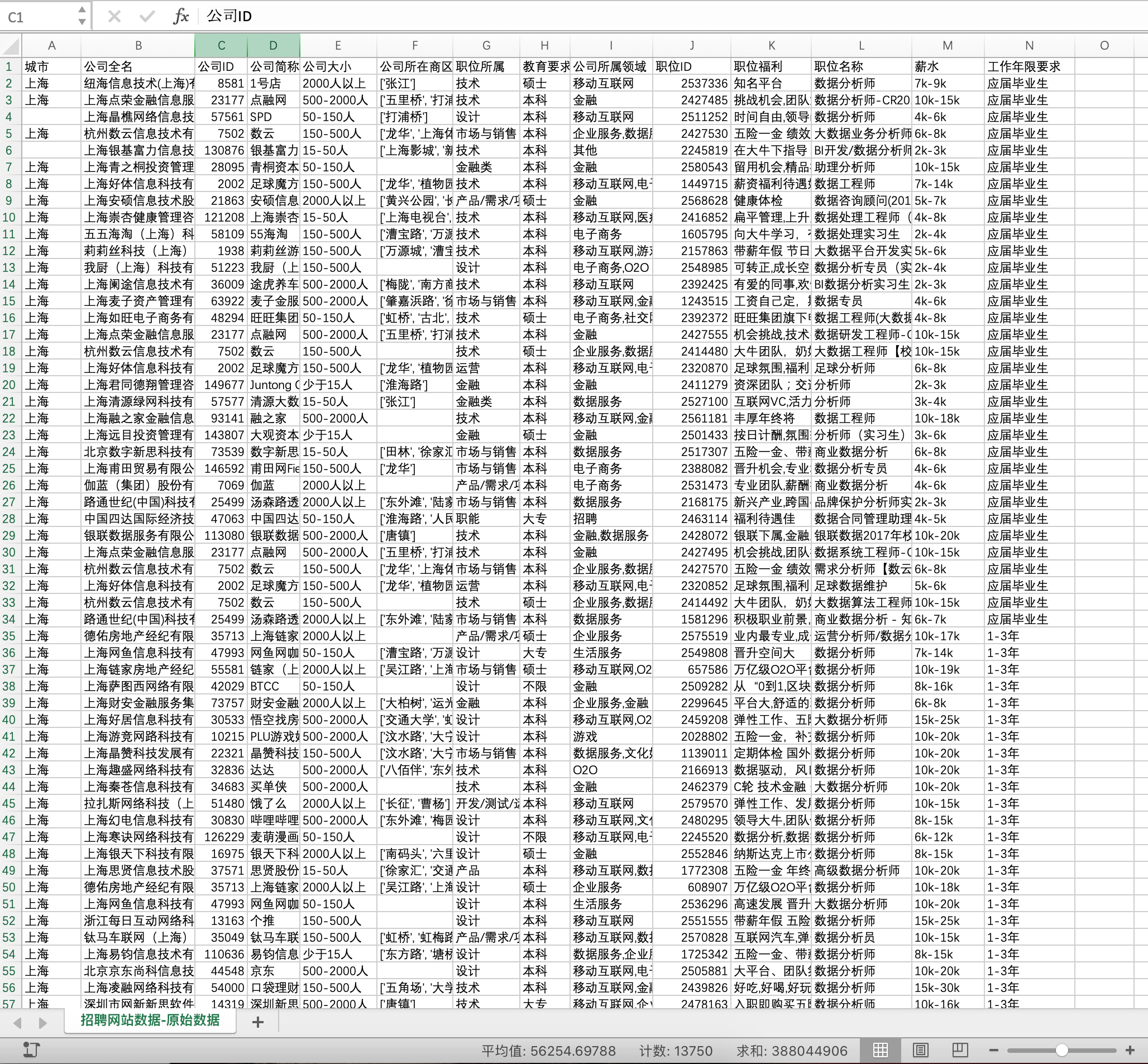
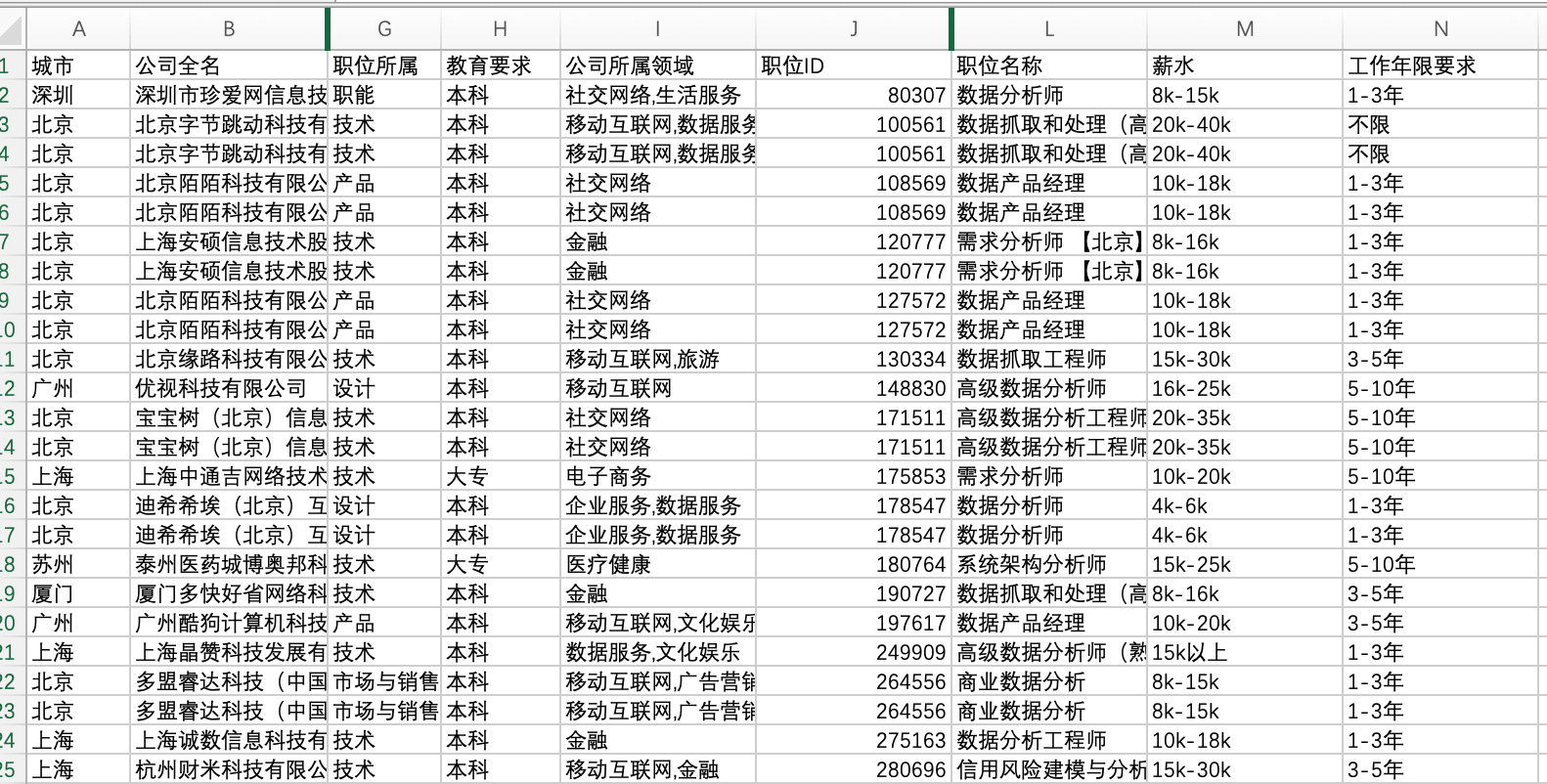
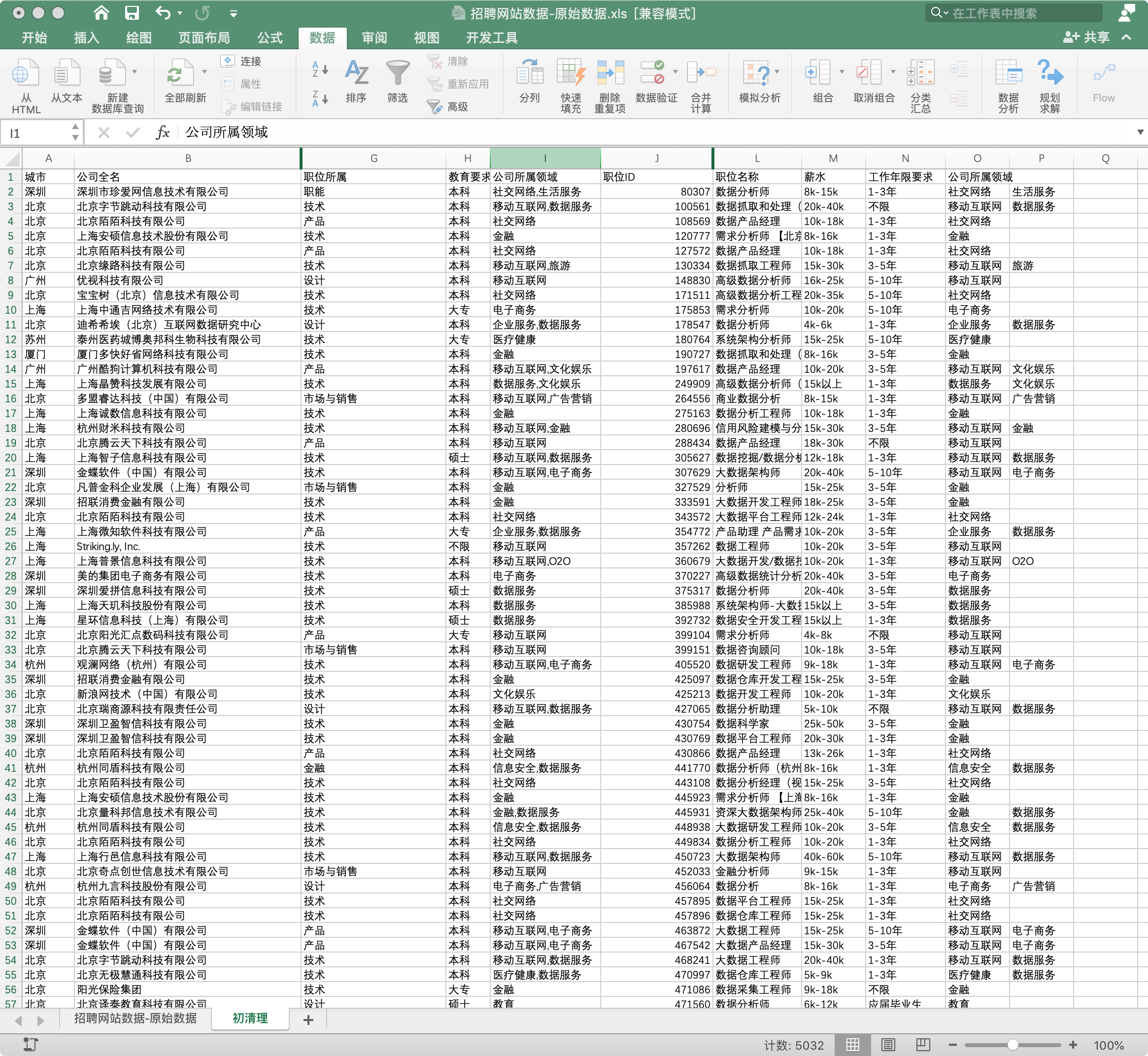
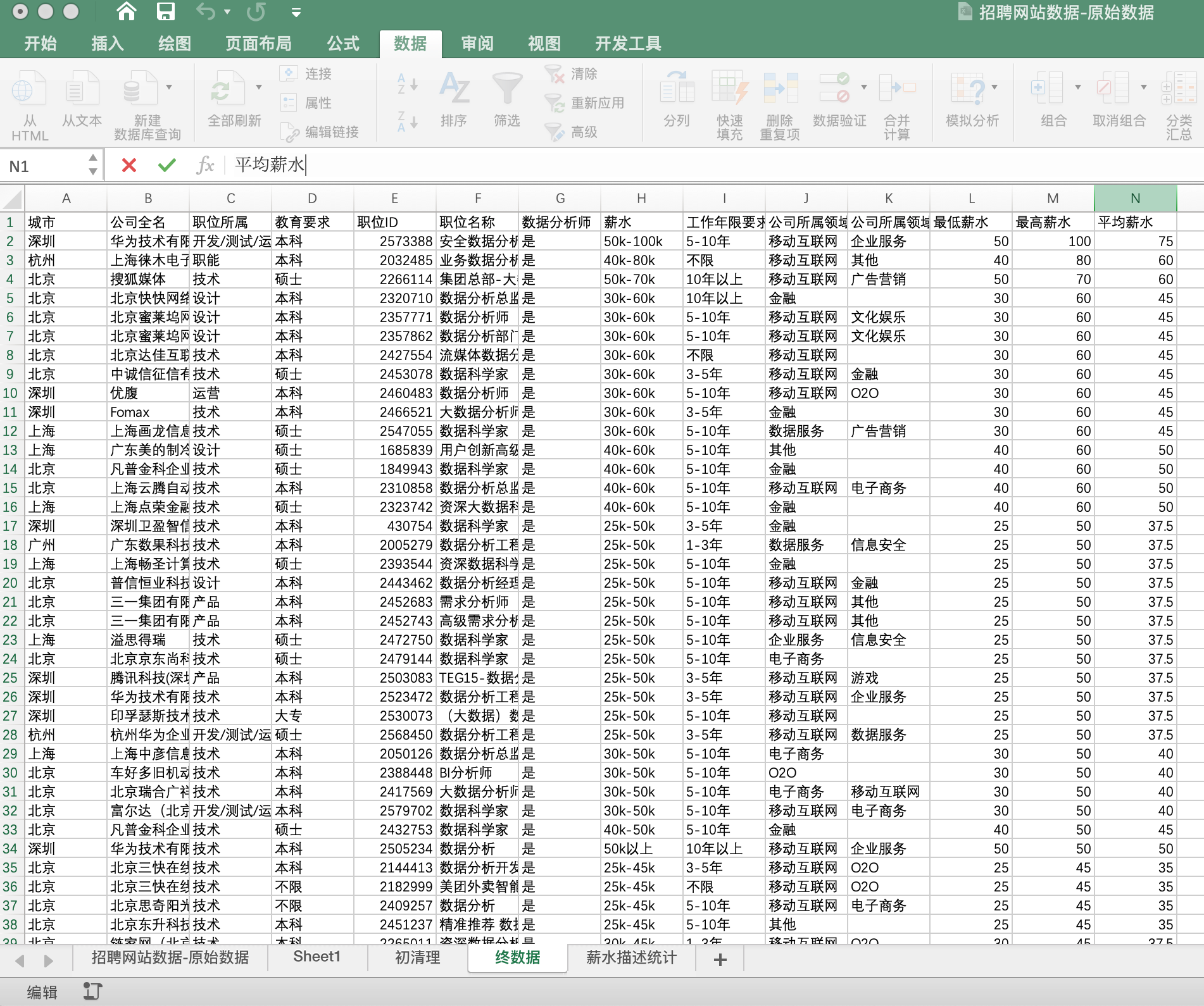
<p>在做数据分析之前，需要对整体数据做一个初步认识，各列数据有什么意义，哪些列是分析必用，哪些是可以暂时有用，哪些是明确无用的。<br>
<img src="https://hsiaopan.github.io/post-images/1591000582031.jpg" alt="" loading="lazy"></p>
<ul>
<li><code>城市</code>：因为需要分析不同城市的情况，还会做出对比，因此 <code>城市</code> 是分析必用的</li>
<li><code>职位ID</code>：在数据无重复情况下，职位ID应当是每个招聘岗位的唯一ID，是必须用到的</li>
<li><code>职位名称</code>：此表中职位名称并没有一个统一，还有些非数据分析师岗位名称，后面处理数据时需要用到</li>
<li><code>薪水</code>：必用的</li>
<li><code>工作年限要求</code>：必用的<br>
以上这些列是此次分析不用用到的列数据。<br>
暂时用不到的列，诸如 <code>公司ID</code> 、<code>公司大小</code> 、<code>职能所属</code> 、<code>教育要求</code> 、<code>公司所属领域</code> ，此次不做分析（如从其他角度分析，则依然有用）<br>
明确用不到的列，如 <code>公司全名</code> 、<code>公司简称</code> 、<code>公司所在商区</code> 、<code>职位福利</code></li>
</ul>
<p>此外，清楚各列数据的数据类型，如字符串、数值等</p>
<h2 id="明确分析问题">明确分析问题</h2>
<ul>
<li>不同城市对数据分析师的需求量比较</li>
<li>数据分析师在不同城市的平均薪资对比</li>
<li>工作年限对薪资影响</li>
<li>不同工作年限的需求量比较</li>
</ul>
<h2 id="数据处理">数据处理</h2>
<p>数据清洗工作是进行数据分析前所必须完成的工作，数据的整洁直接影响数据分析结果的呈现。</p>
<h3 id="1理解数据选择重点分析对象">1.理解数据，选择重点分析对象</h3>
<p>在分析前准备中提到，原始数据中包含很多列数据，有些数据不是重点分析对象，可将其隐藏。<br>
<img src="https://hsiaopan.github.io/post-images/1590989122693.jpg" alt="" loading="lazy"><br>
<em>隐藏前</em><br>
<img src="https://hsiaopan.github.io/post-images/1591002416200.jpg" alt="" loading="lazy"><br>
<em>隐藏后</em></p>
<h3 id="2删除重复值">2.删除重复值</h3>
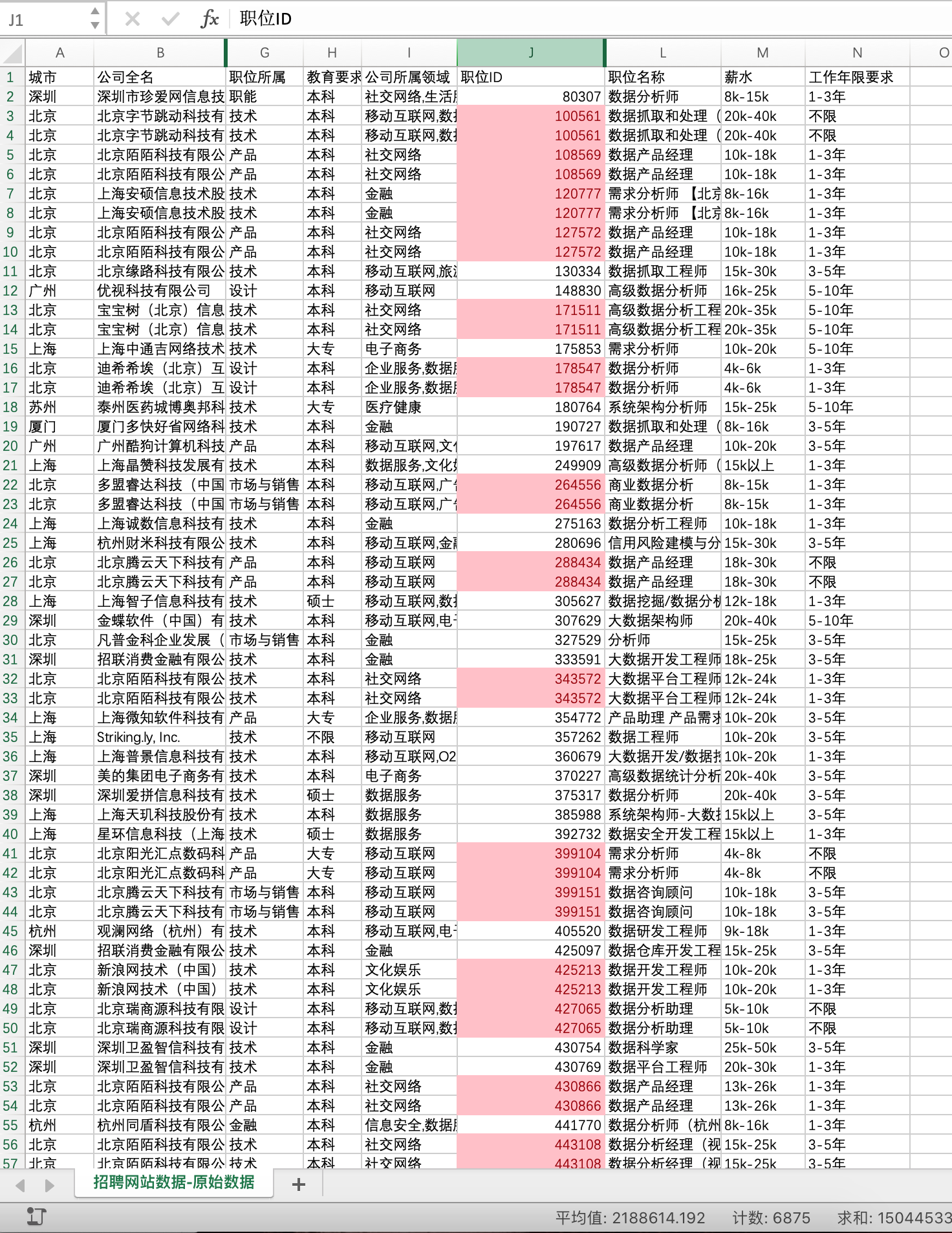
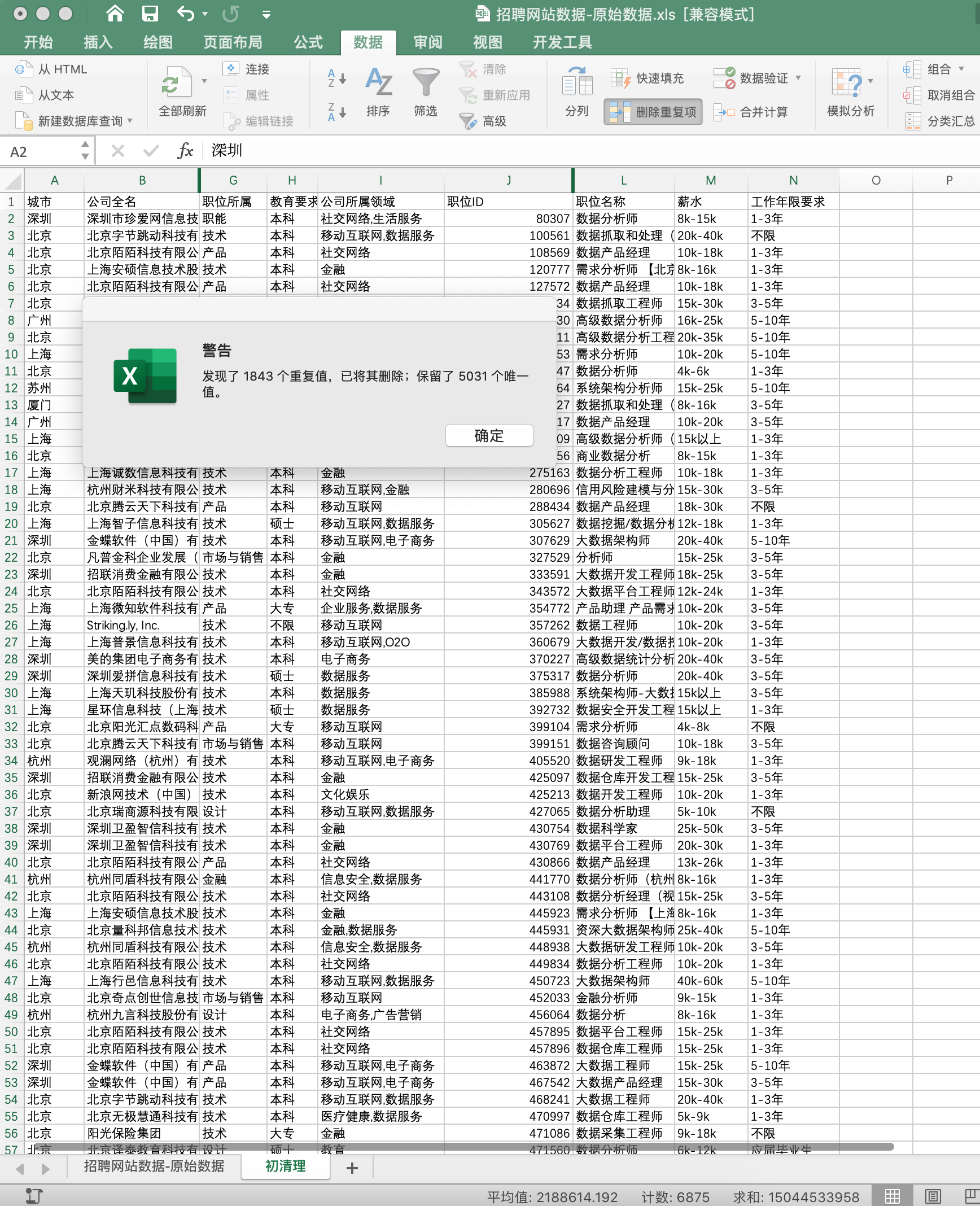
<p>本数据中一个 <code>职位ID</code> 对应一个<strong>职位</strong>，检查 <code>职位ID</code> 列是否有重复，如果有则将重复值删除<br>
具体操作：</p>
<ul>
<li><code>条件格式</code>&gt;<code>突出显示单元格规则</code>&gt;<code>重复值</code><br>
<img src="https://hsiaopan.github.io/post-images/1590989050028.jpg" alt="" loading="lazy"></li>
<li><code>数据</code>&gt;<code>删除重复值</code>&gt;<code>选择列</code>，选择 <code>职位ID</code> 列<br>
<img src="https://hsiaopan.github.io/post-images/1590990563550.jpg" alt="" loading="lazy"></li>
</ul>
<h3 id="3处理缺失值">3.处理缺失值</h3>
<p>检查每一列的值是否一致，查看是否存在缺失值<br>
选中所在列：<code>开始</code>&gt;<code>查找与选择</code>&gt;<code>定位条件</code>&gt;<code>空值</code>&gt;输入值</p>
<blockquote>
<p>缺省值处理的常用方法：</p>
<ul>
<li>通过人工手动补全</li>
<li>删除缺省值</li>
<li>用平均值替代缺省值</li>
<li>用统计模型计算出的值去代替缺省值</li>
</ul>
</blockquote>
<h3 id="4一致化处理">4.一致化处理</h3>
<p>把所有的数据处理成容易使用公式或数据透视表的形式</p>
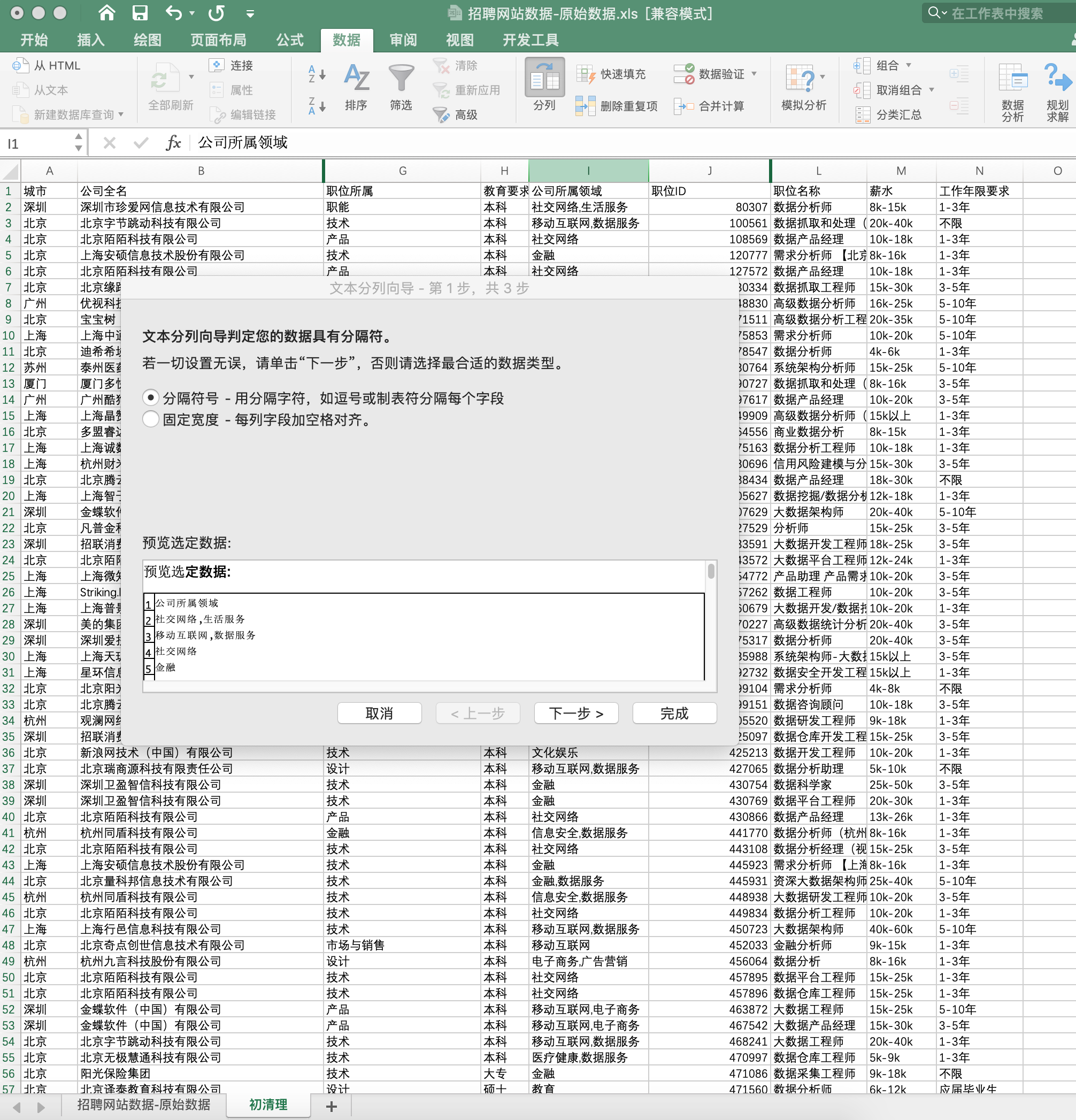
<p>数据表中 <code>公司所属领域</code> 这一列，有些公司从属于一个行业，有些公司则从属于两个行业，此时需要将这两个行业分割开来。使用 <code>分列</code>。<br>
<img src="https://hsiaopan.github.io/post-images/1590990673966.jpg" alt="" loading="lazy"><br>
<img src="https://hsiaopan.github.io/post-images/1590990692337.jpg" alt="" loading="lazy"></p>
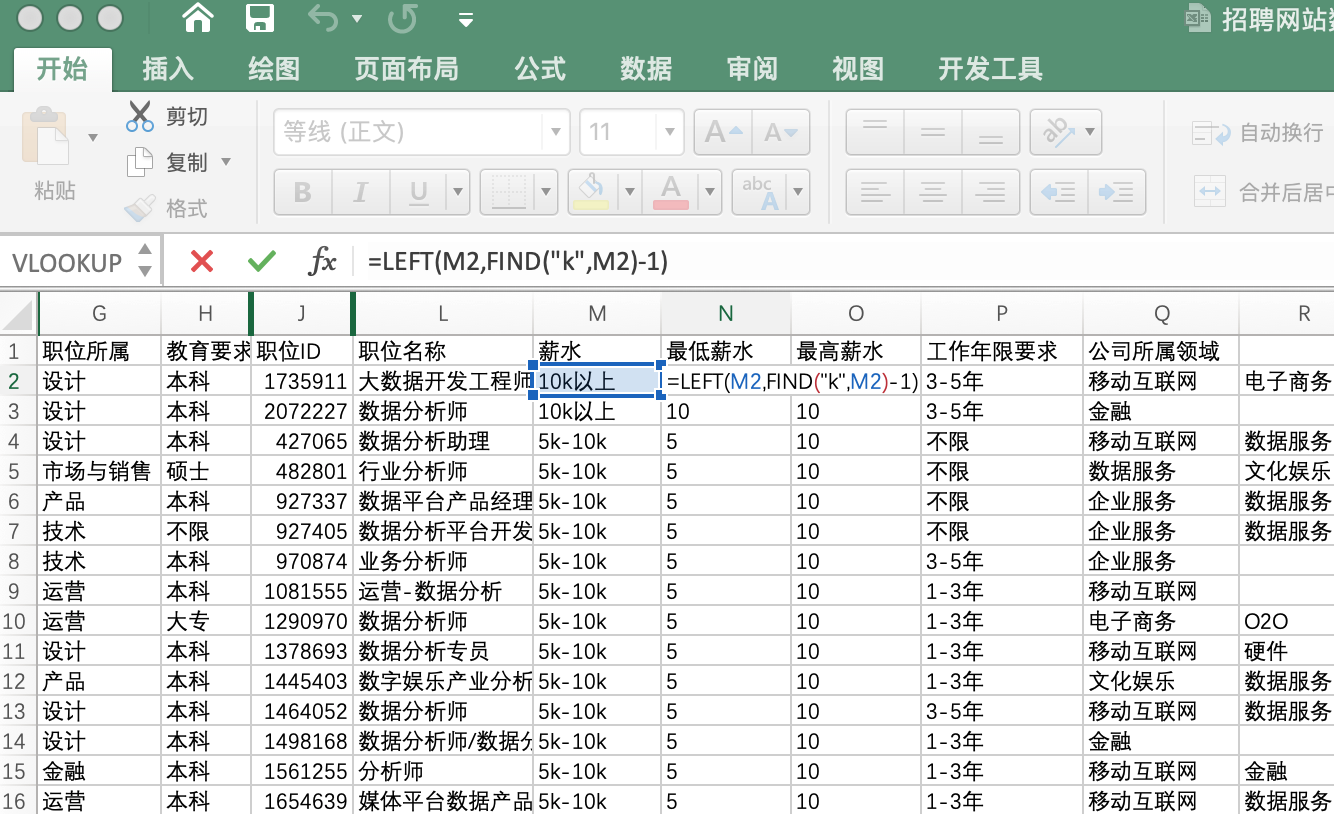
<p>数据表中 <code>薪水</code> 这一列是以区间方式表示的，把最低薪水和最高薪水分隔开来以便使用图表查看薪水情况<br>
此处涉及到对表格字符串截取的操作，通常使用函数<strong>LEFT/RIGHT/MID</strong>截取，用函数<strong>FIND</strong>和<strong>LEN</strong>进行定位。<br>
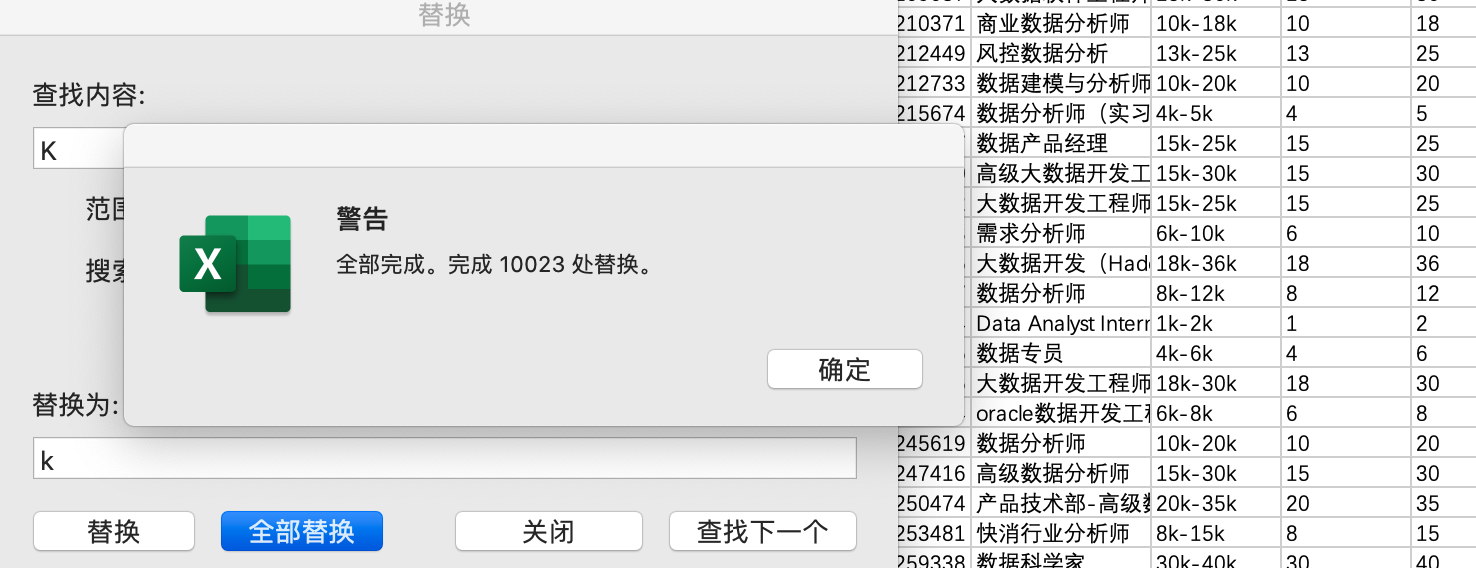
观察发现 <code>薪水</code>列中数据有出现大小写<strong>K/k</strong>混用情况，先将他们统一替换成小写<strong>k</strong><br>
<img src="https://hsiaopan.github.io/post-images/1590990737454.jpg" alt="" loading="lazy"></p>
<p>插入两列，分别提取最低薪水和最高薪水。<br>
<img src="https://hsiaopan.github.io/post-images/1590990780347.jpg" alt="" loading="lazy"><br>
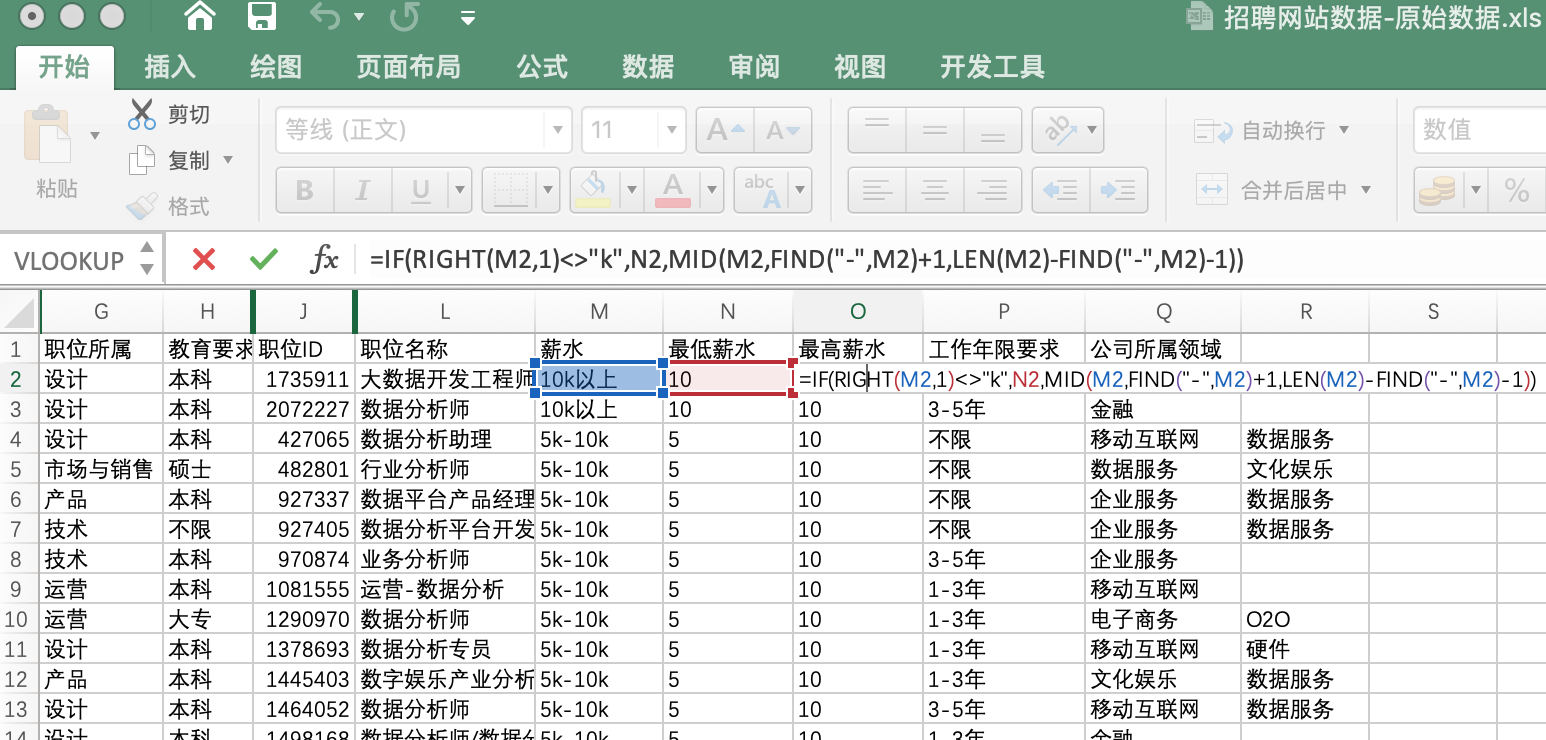
因 <code>薪水</code> 中一些单元格内是“xx以上”或“xx以下”，不能直接套用复合函数，我们可以先对单元格进行判断，不是以 “<strong>k</strong>”结束的单元格，最高薪水暂定与最低薪水相同。<br>
<img src="https://hsiaopan.github.io/post-images/1590990794957.jpg" alt="" loading="lazy"></p>
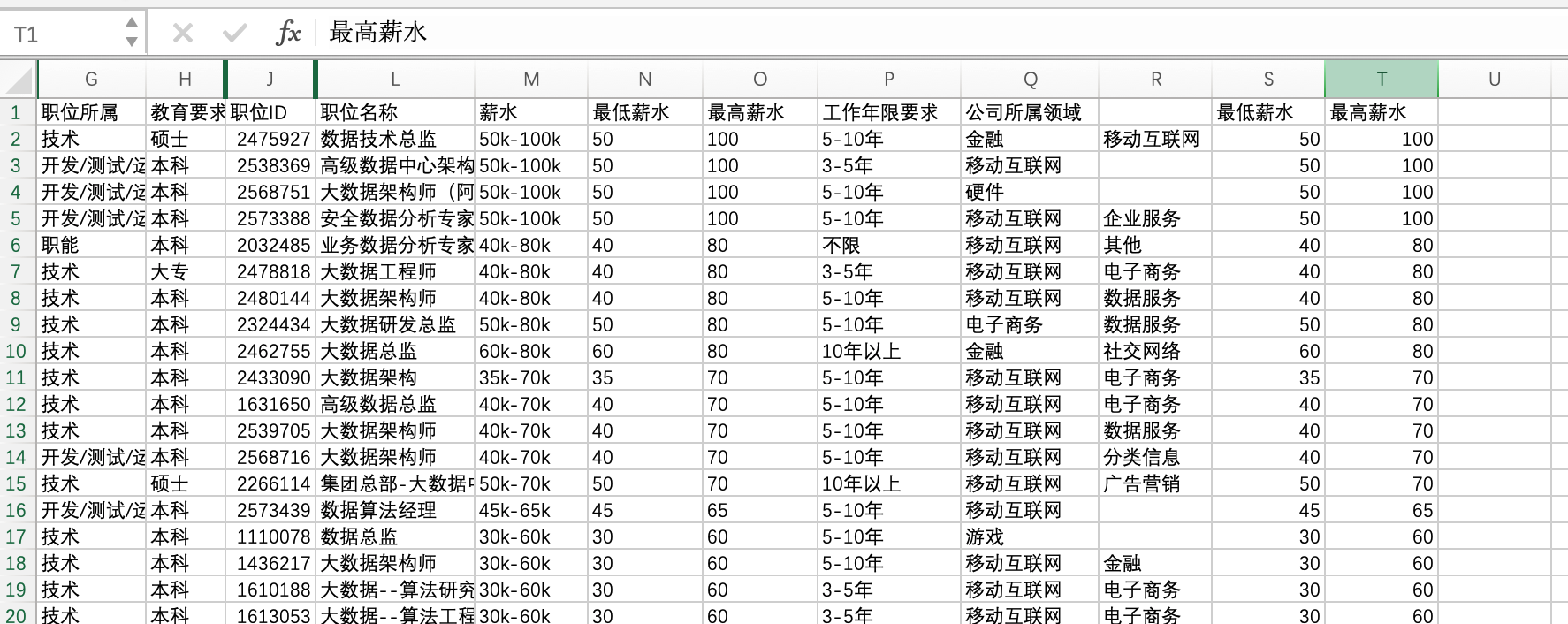
<p>经过单元格计算得到的最高薪水和最低薪水是文本型数据，无法正常按照数值进行排序，需要将结果复制出来，新建列表。<br>
流程如下：<br>
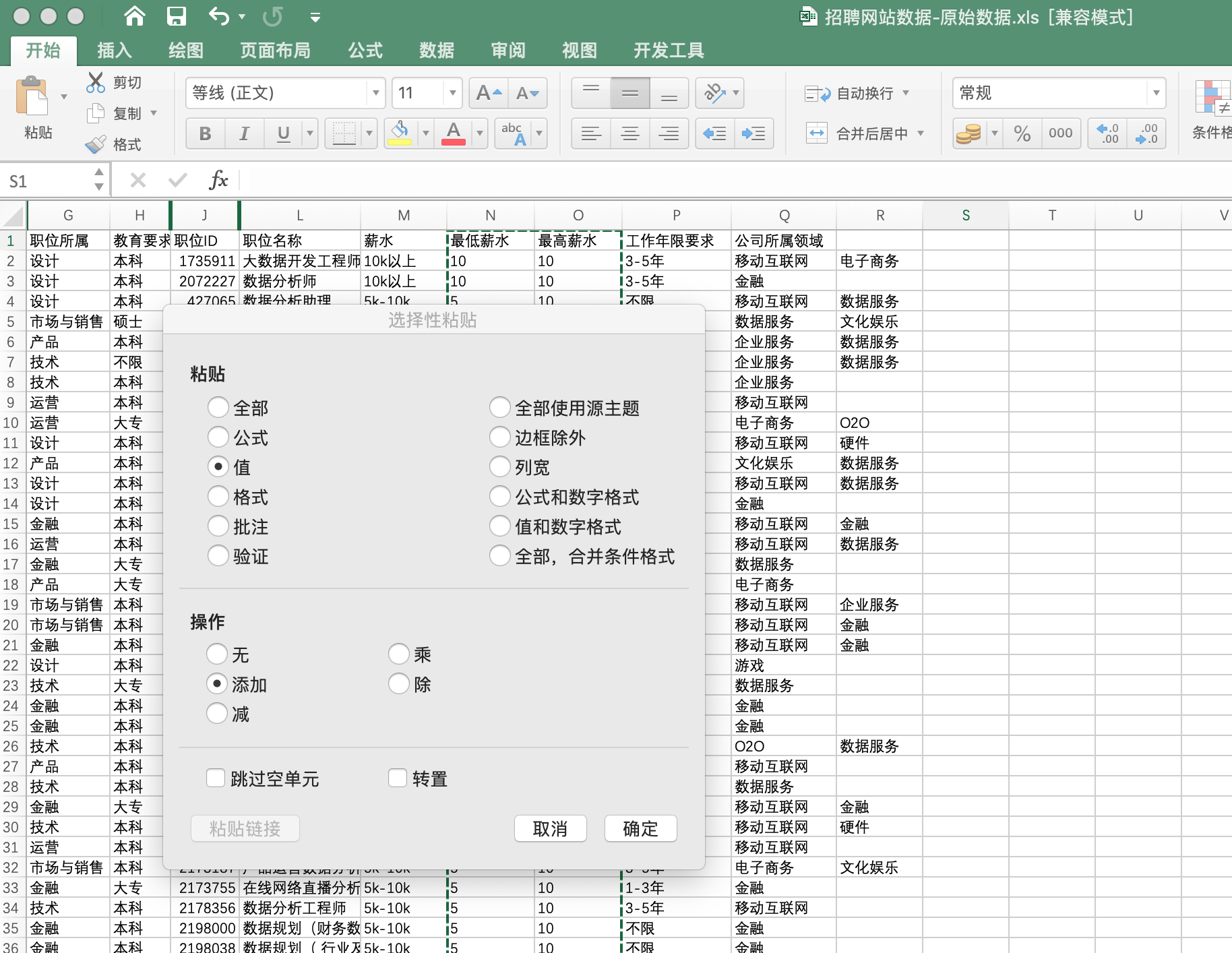
<code>开始</code>&gt;<code>选择性粘贴</code>&gt;勾选<code>值</code>和<code>添加</code>，然后补全列表名<br>
<img src="https://hsiaopan.github.io/post-images/1590991790591.jpg" alt="" loading="lazy"></p>
<p>可实现正常排序<br>
<img src="https://hsiaopan.github.io/post-images/1590991804223.jpg" alt="" loading="lazy"></p>
<p><code>职位名称</code> 列内职位名称种类非常多，有些甚至不是数据分析师，需要先初步判断下那些需要留存。<br>
<img src="https://hsiaopan.github.io/post-images/1590992307204.jpg" alt="" loading="lazy"><br>
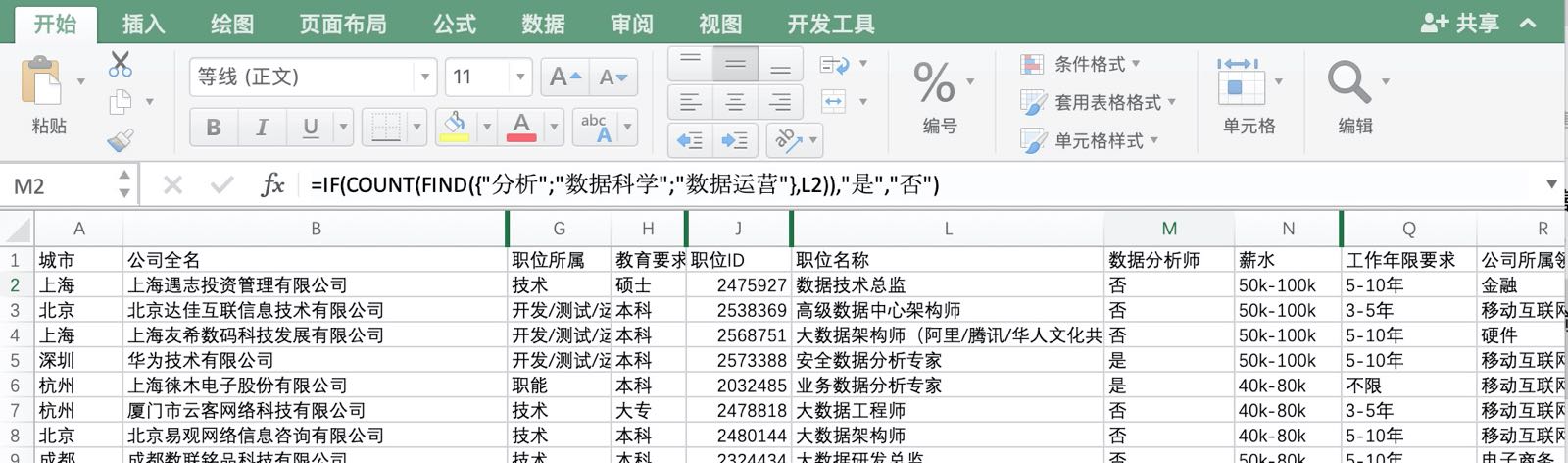
可以提取含有“数据分析”、“分析师”、“数据科学”、“数据运营”的行。<br>
新建一列表名“数据分析师”，使用函数<strong>IF/COUNT/FIND</strong>，如果单元格中含有“分析”、“数据科学”、“数据运营”，则返回“是”<br>
<img src="https://hsiaopan.github.io/post-images/1590992419601.jpg" alt="" loading="lazy"></p>
<p>筛选 <code>数据分析师</code> 列中为“<strong>是</strong>”的所有行，，完成对数据分析师列数据的统一。<br>
复制整个表数据作为最终数据<br>
<img src="https://hsiaopan.github.io/post-images/1590992035301.jpg" alt="" loading="lazy"></p>
<h2 id="构建模型">构建模型</h2>
<p>数据经过清洗之后，需要构建一套模型，以实现分析这些数据的目的。<br>
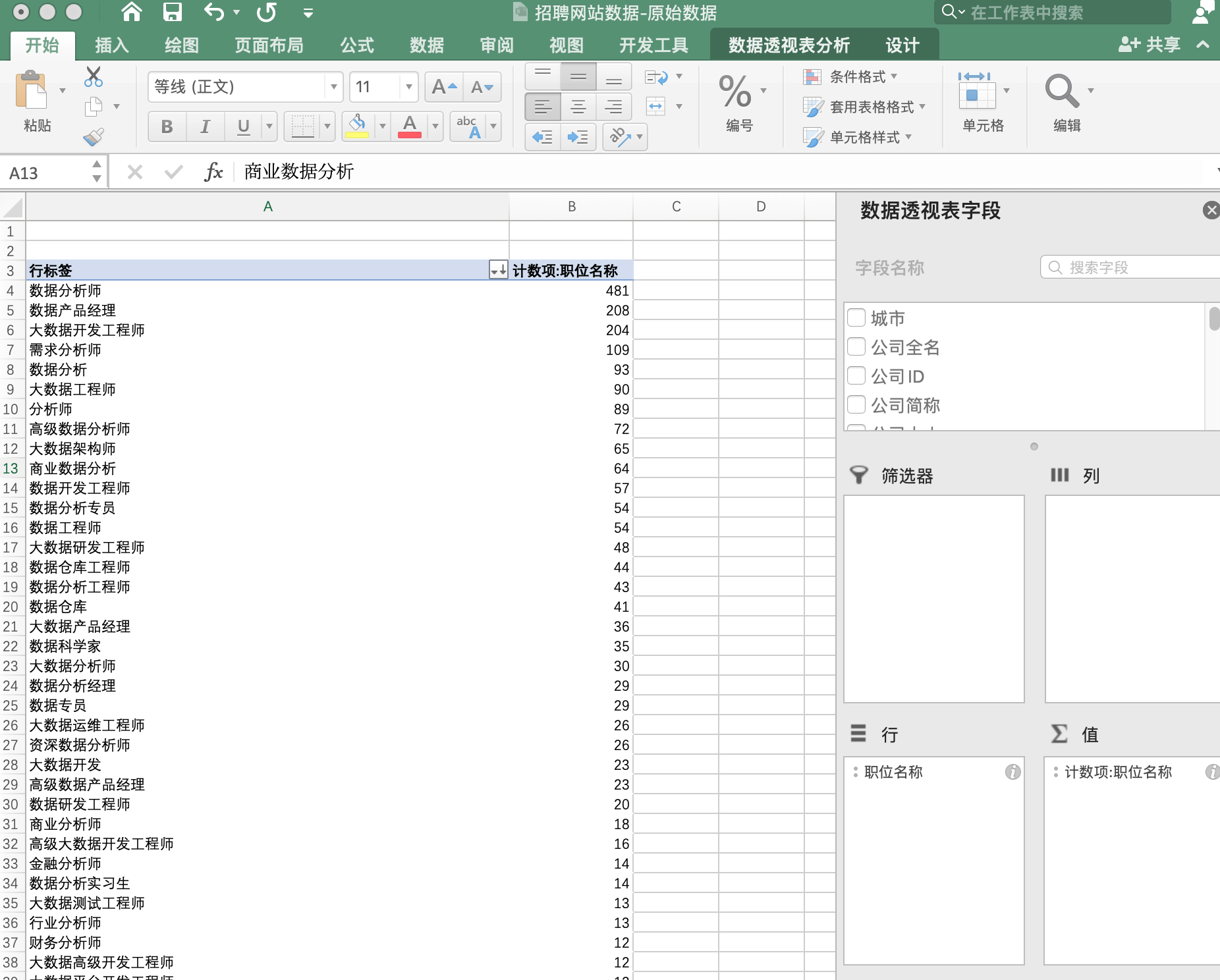
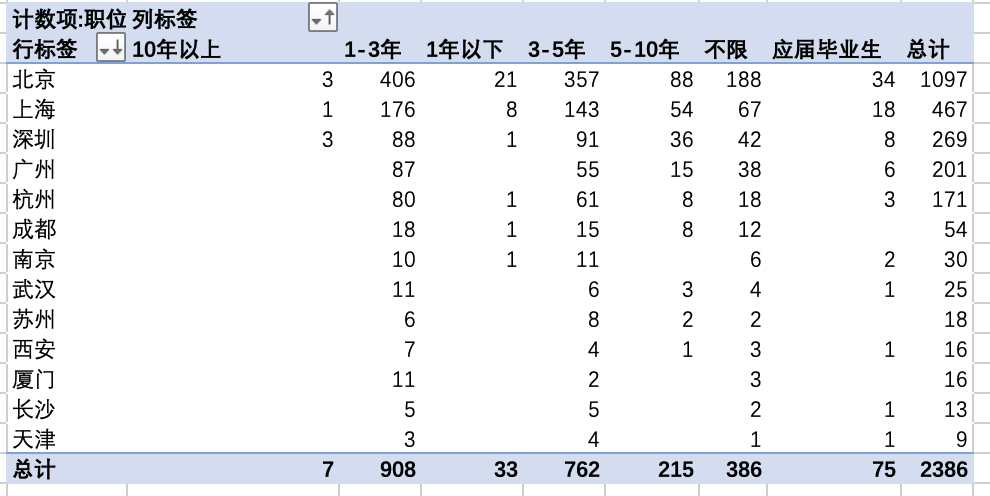
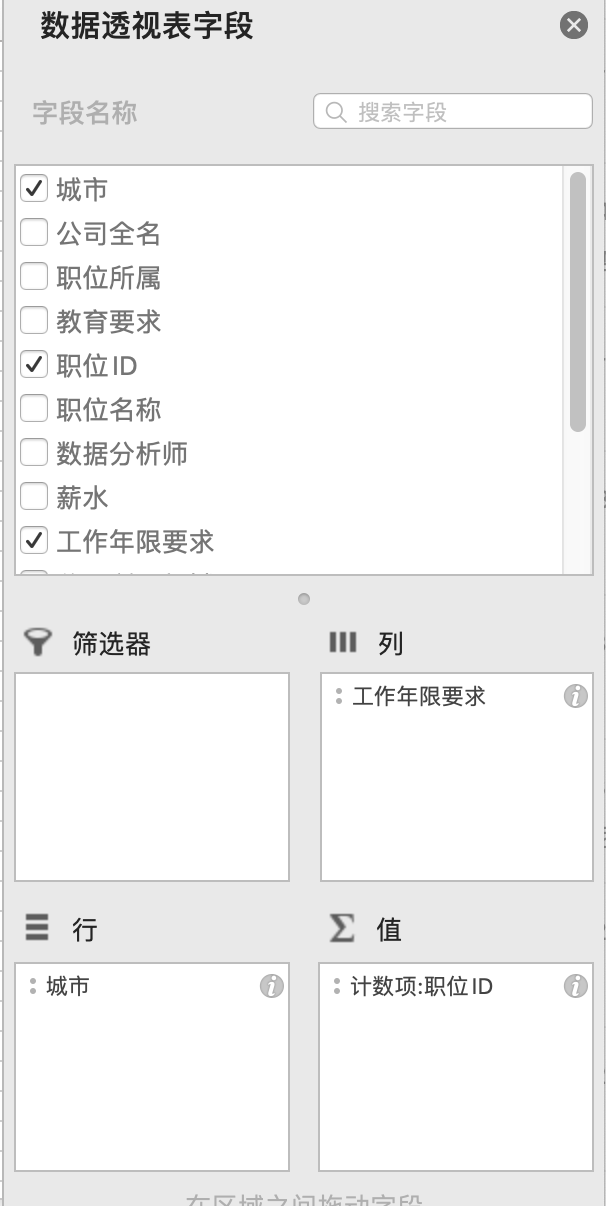
如前面提到，想要知道不同城市的数据分析师招聘岗位对不同工作年限的人是怎样的需求情况，利用数据透视功能，得到以下数据透视表：<br>
<img src="https://hsiaopan.github.io/post-images/1590992146789.jpg" alt="" loading="lazy"><br>
<img src="https://hsiaopan.github.io/post-images/1590992153034.jpg" alt="" loading="lazy"><br>
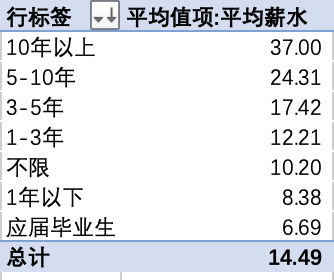
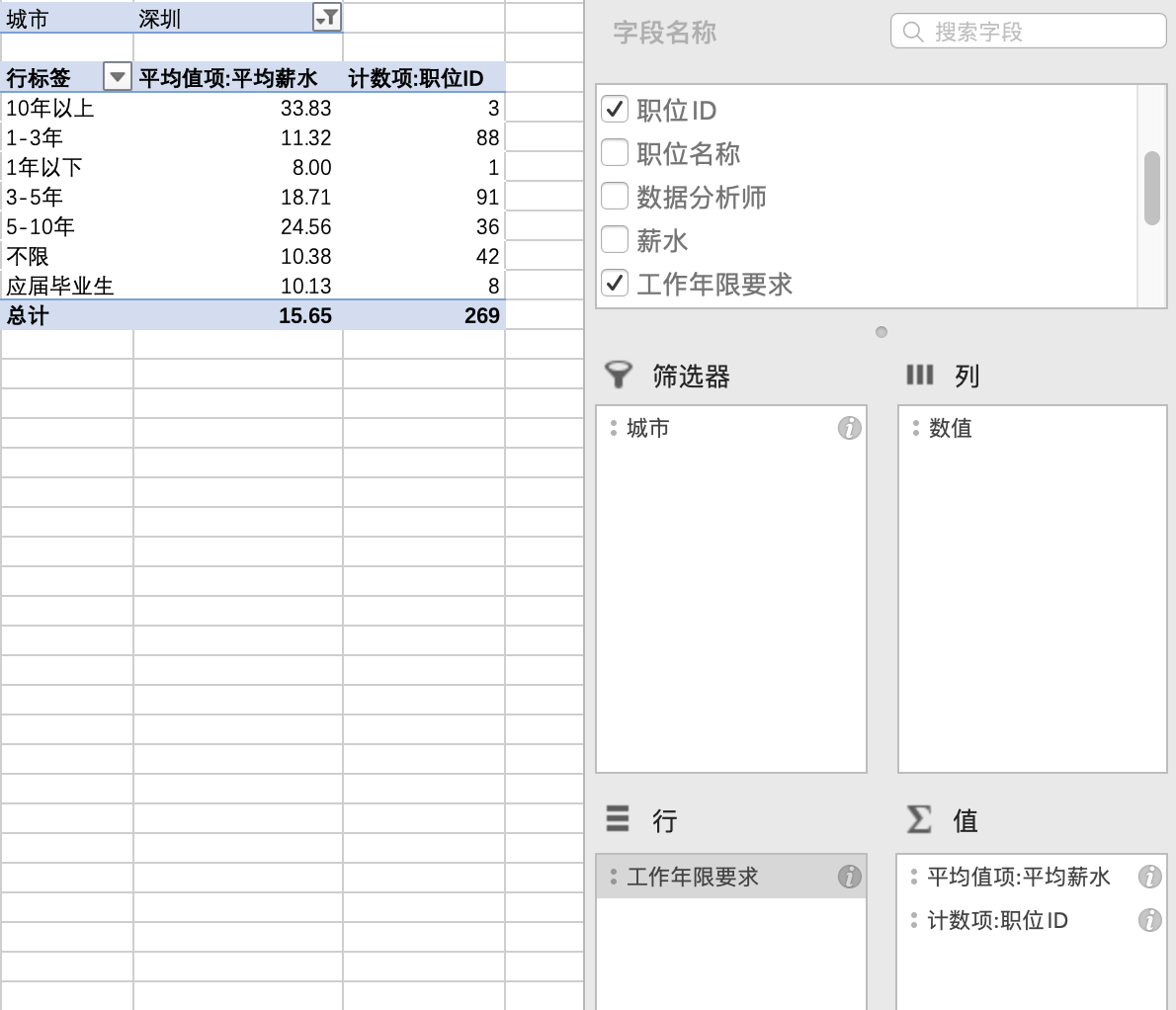
想要获取不同工作年限的岗位提供的薪资水平情况，可得到以下数据透视表：<br>
<img src="https://hsiaopan.github.io/post-images/1590993620998.jpg" alt="" loading="lazy"><br>
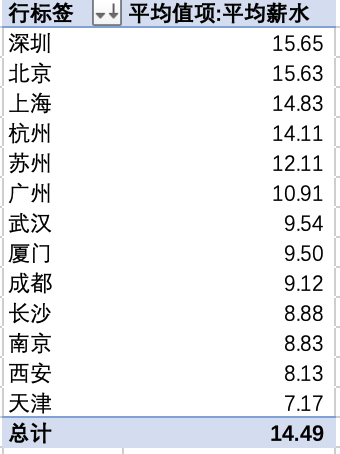
想要获取不同城市的平均薪资水平，可得以下数据透视表：<br>
<img src="https://hsiaopan.github.io/post-images/1590993667780.jpg" alt="" loading="lazy"></p>
<figure data-type="image" tabindex="1"><img src="https://hsiaopan.github.io/post-images/1590999101248.jpg" alt="" loading="lazy"></figure>
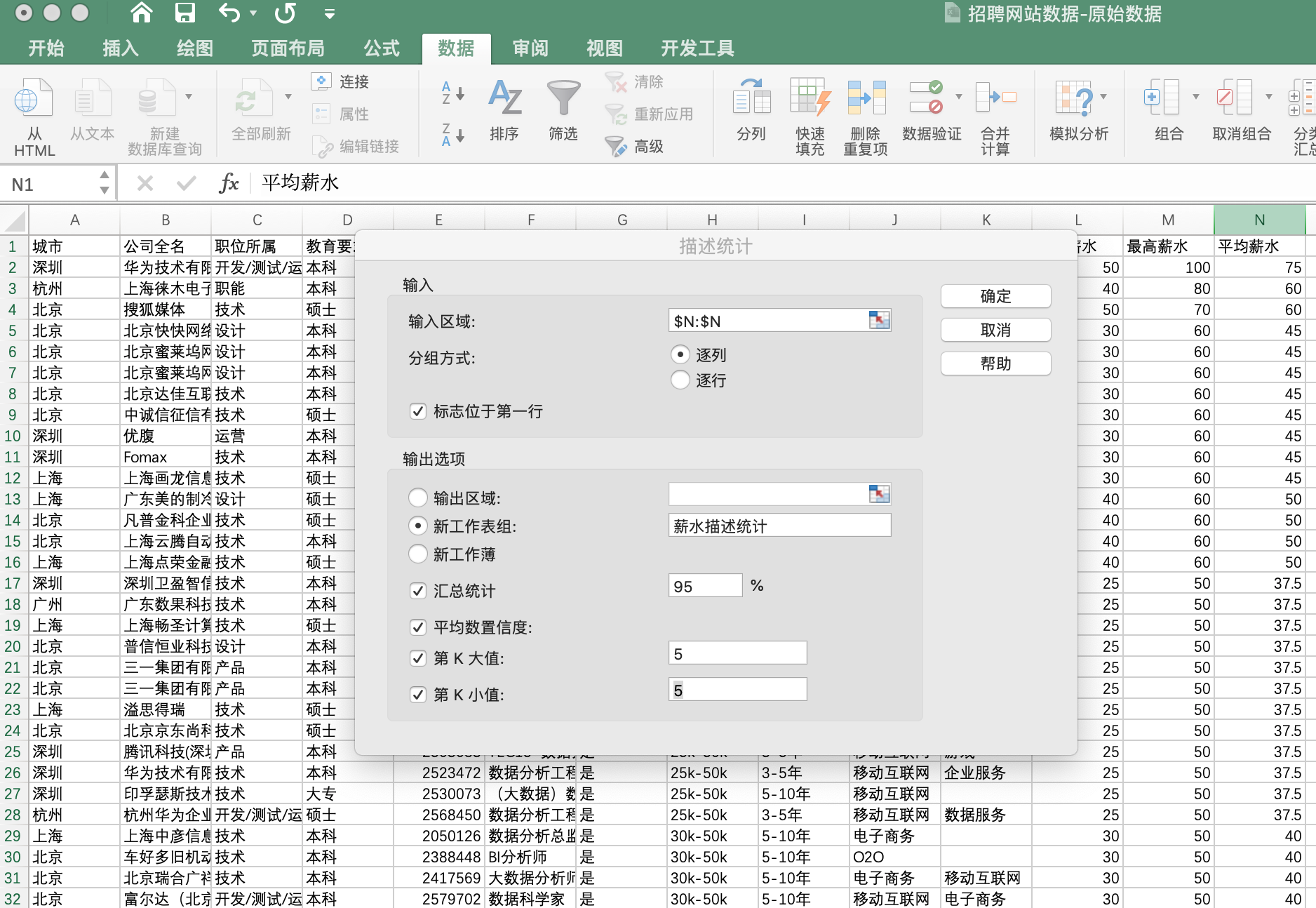
<p>利用“<strong>描述性统计</strong>”功能可以堆平均薪资进行分析，<br>
<code>数据</code>&gt;<code>数据分析</code>&gt;<code>描述统计</code><br>
<img src="https://hsiaopan.github.io/post-images/1590993915177.jpg" alt="" loading="lazy"><br>
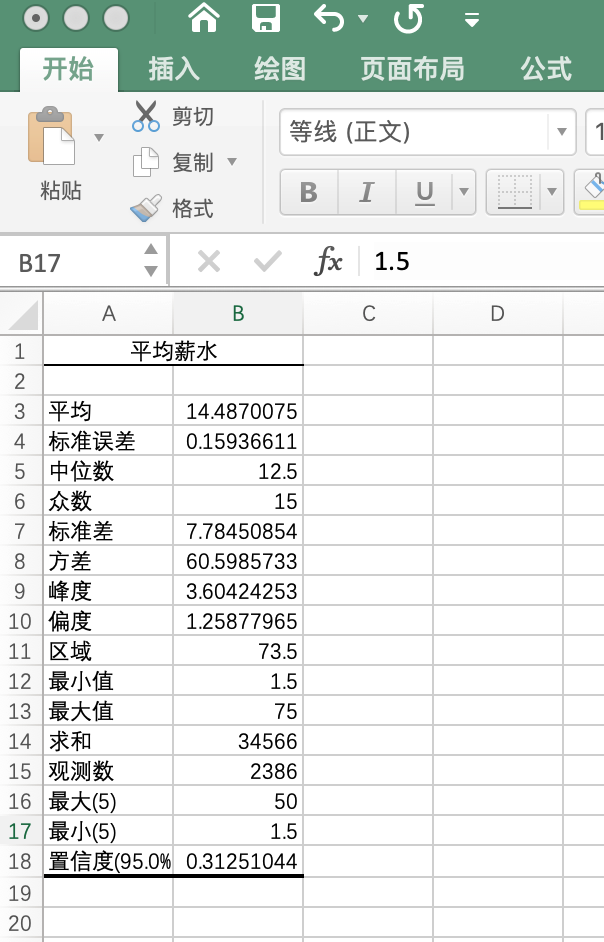
描述性统计结果：<br>
<img src="https://hsiaopan.github.io/post-images/1590992683050.jpg" alt="" loading="lazy"></p>
<h2 id="数据可视化">数据可视化</h2>
<p>根据前面生成的数据透视表，可作出以下可视化图标：</p>
<ul>
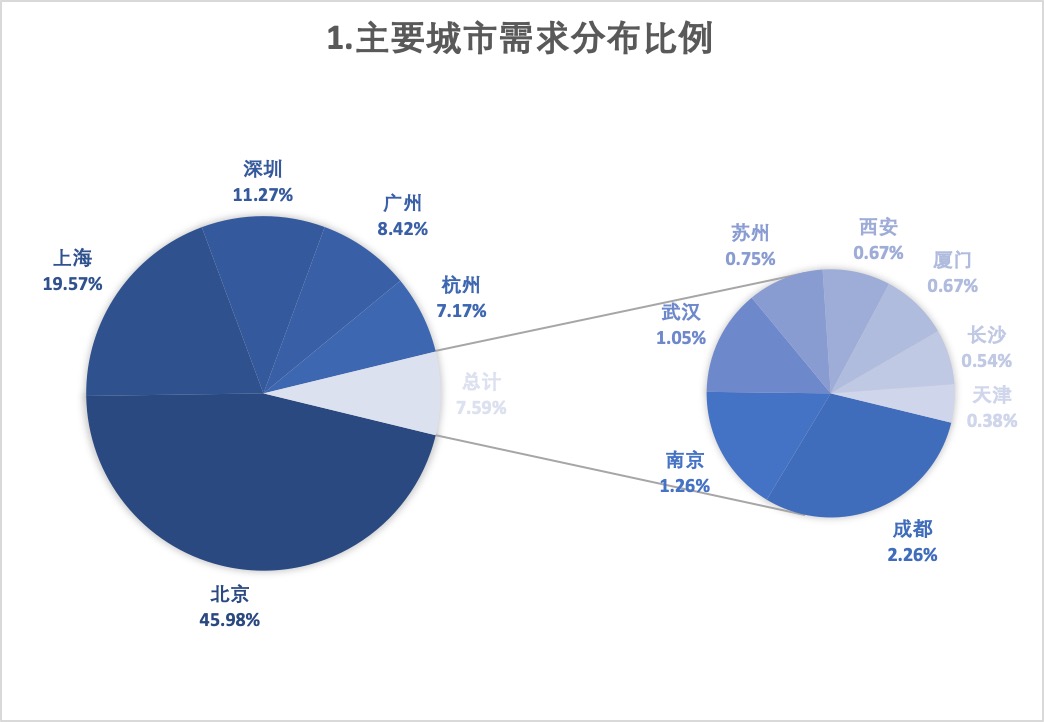
<li>主要城市数据分析师需求情况<br>
<img src="https://hsiaopan.github.io/post-images/1590999009906.jpg" alt="" loading="lazy"></li>
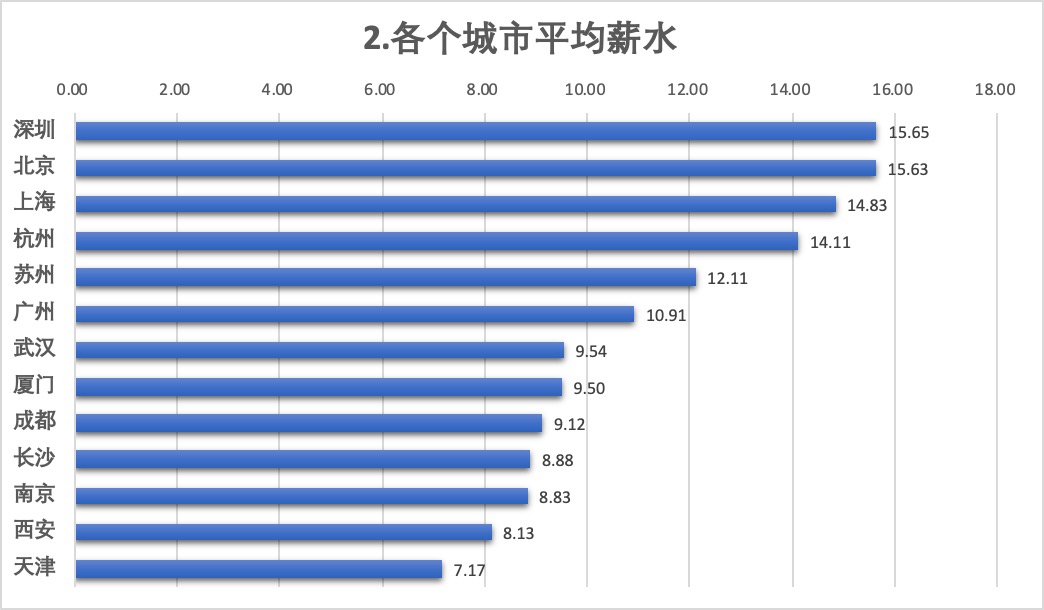
<li>各城市数据分析师平均薪水情况<br>
<img src="https://hsiaopan.github.io/post-images/1590999036118.jpg" alt="" loading="lazy"></li>
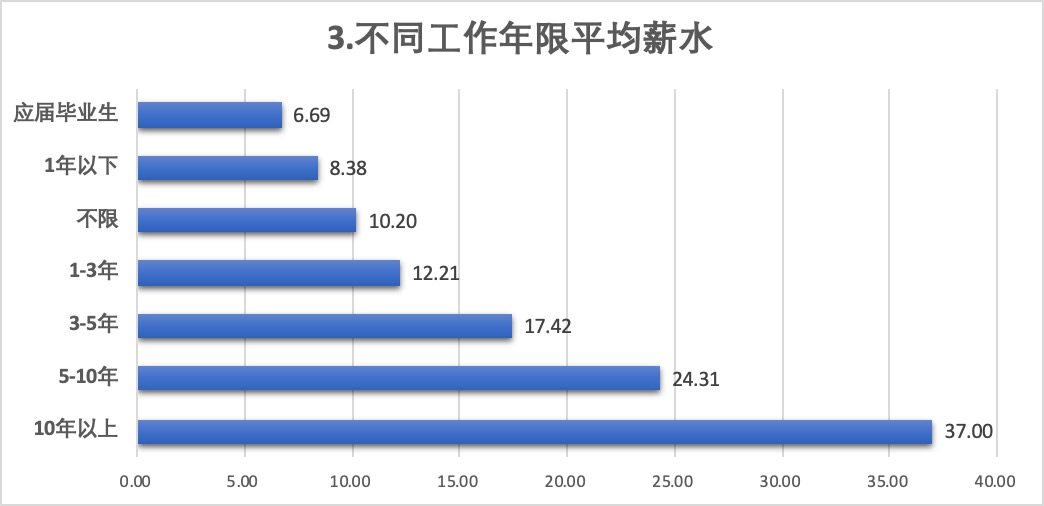
<li>不同工作年限的平均薪水对比<br>
<img src="https://hsiaopan.github.io/post-images/1590999047688.jpg" alt="" loading="lazy"></li>
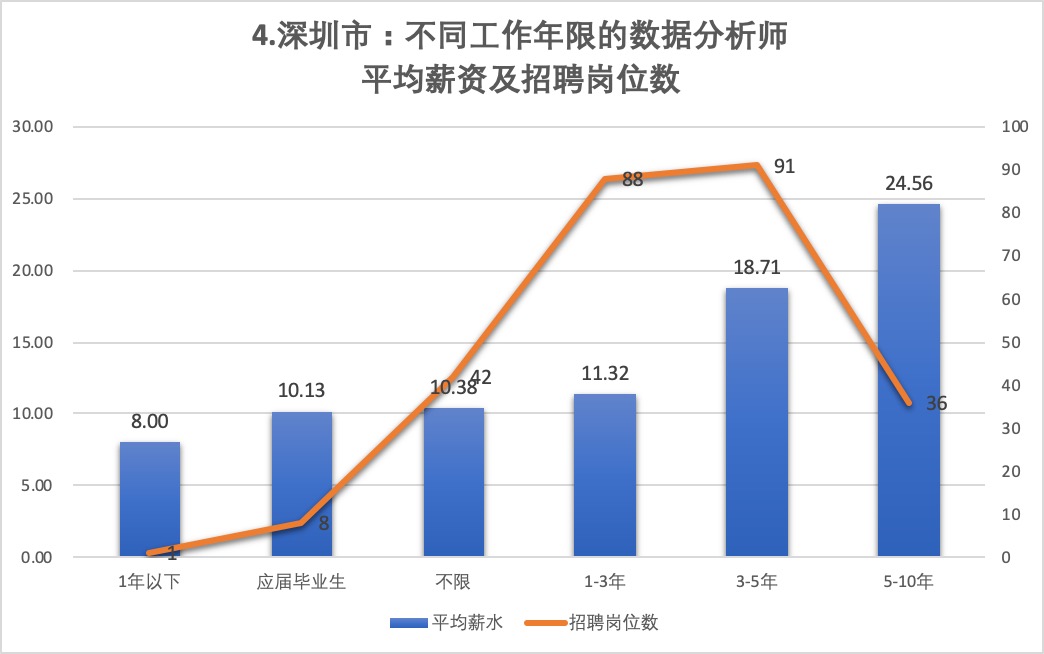
<li>深圳市不同工作年限数据分析师的平均薪水和需求对比<br>
<img src="https://hsiaopan.github.io/post-images/1590999064895.jpg" alt="" loading="lazy"></li>
</ul>
<h2 id="结论">结论</h2>
<ul>
<li>从需求情况可以看出，数据分析师的工作机会主要集中在一线城市，北京居首；新一线城市中也有一些机会，接近一线城市，如杭州7.17%与广州8.42%差距已不大</li>
<li>从各城市平均薪水表可以看到，该岗位在深圳的薪水最高，其次是北京、上海</li>
<li>随着经验累积，薪酬不断提升，3-5年工作经验的薪水已接近1-3年经验的两倍，10年以上经验的虽超过3倍，但该阶段需求很小，数据量小，难以反映真实情况</li>
<li>从深圳的数据分析师需求来看，因为职业较新，主要工作机会给予集中在1-5年有经验的人身上</li>
</ul>
]]></content>
    </entry>
    <entry>
        <title type="html"><![CDATA[关于]]></title>
        <id>https://hsiaopan.github.io/post/about/</id>
        <link href="https://hsiaopan.github.io/post/about/">
        </link>
        <updated>2019-05-01T11:09:48.000Z</updated>
        <content type="html"><![CDATA[<blockquote>
<p>欢迎来到我的小站呀，很高兴遇见你！🤝</p>
</blockquote>
<h2 id="关于本站">🏠 关于本站</h2>
<p>本站主要作为我的个人成长记录，从开始写那一刻开始记录。</p>
<h2 id="博主是谁">👨‍💻 博主是谁</h2>
<p>华中地区某普通211毕业的农学背景男。<br>
大学期间辅修过建筑学，未完成学业。<br>
研究生在某国内头部大学师从某行业国内领军人物，但因种种原因未完成学业。</p>
<h2 id="兴趣爱好">⛹ 兴趣爱好</h2>
<p>没有固定兴趣爱好。可以打游戏，可以撸代码。</p>
<h2 id="联系我呀">📬 联系我呀</h2>
<p>暂时不了。</p>
]]></content>
    </entry>
</feed>